Project management software turns a list of work into something a team can plan, assign and track. Most comparison pages rank tools on testing you cannot see. This guide does not rank them.
listing.sh did not test these tools hands-on. Every price, limit and feature below comes from the vendor's own pricing page or documentation, checked on October 20, 2026. Where a page was unclear, the guide says so. Confirm each figure on the vendor page before you buy.
The guide covers 12 tools: Asana, monday.com, ClickUp, Jira, Trello, Notion, Linear, Wrike, Smartsheet, Basecamp, and two open-source options, Plane and OpenProject. It also explains the methods and views these tools are built around.
How to read the prices
Prices are in US dollars per user per month, billed annually, as of October 2026, unless a line says otherwise. They exclude tax.
What project management software does
Every tool in this guide stores work items: a task, issue, card or work package with an owner, a status, a due date and custom fields. Everything else is a way to capture, see, move or report on those items.
- Capture: forms, email and integrations turn requests into work items.
- Plan: list, board, timeline and Gantt views arrange items by status or by date.
- Automate: rules move items and notify people. Most vendors cap rule runs per month.
- Report: dashboards and workload views show what is late and who has too much.
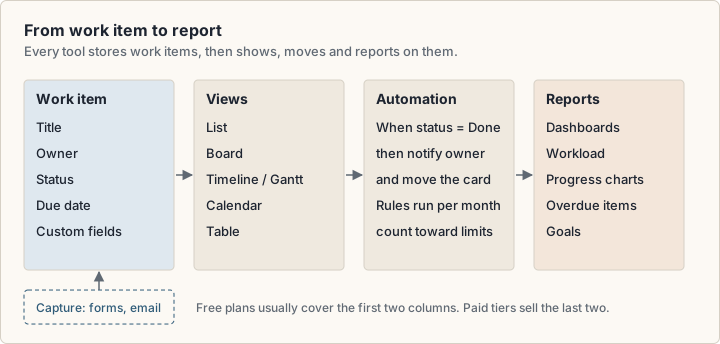
Project tracking software and task tracking software are the tracking half of the same category. If you only need to see who does what, most free plans cover it. Paid tiers mostly sell date planning (timeline and Gantt), more automation, reporting and admin controls.
The top project management apps, and how this list was chosen
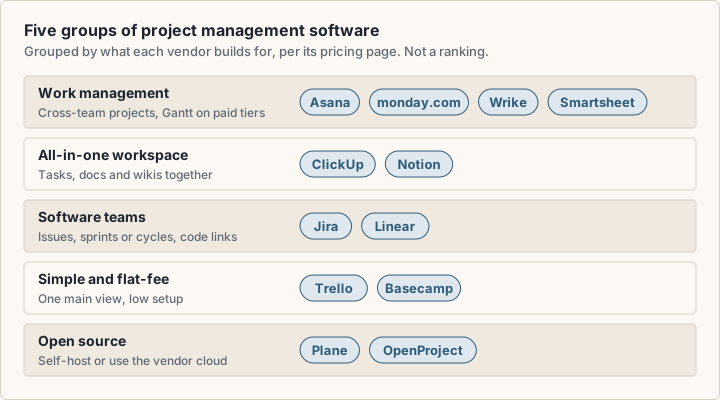
This list is a scope, not a ranking. It includes tools that appear on the first page of Google US results for project management software in our 20 October 2026 check, plus Linear, which listing.sh already covers, and two open-source options. The 12 tools fall into five groups by what each vendor builds for. The groups are not quality tiers.
- Work management: Asana, monday.com, Wrike and Smartsheet, for projects that cross teams.
- All-in-one workspaces: ClickUp and Notion, with tasks and docs in one place.
- Software teams: Jira and Linear, built around issues, sprints or cycles.
- Simple and flat-fee: Trello and Basecamp, with less setup.
- Open source: Plane and OpenProject, which you can host yourself.
Project management methodologies and the tools that fit them
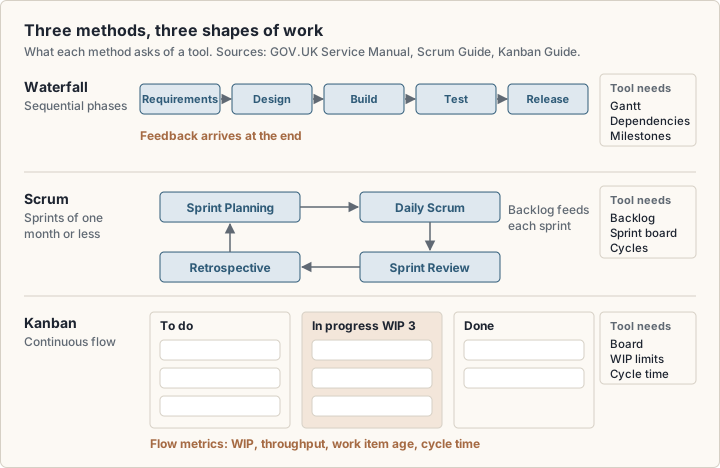
A methodology is how a team decides what to do next. Pick a tool that supports the method you already use. Three methods cover most teams.
Waterfall: sequential delivery
In a waterfall project, phases run in order: requirements, design, build, test, release. The UK Government Service Manual (opens in a new tab) says "With waterfall methods the process is sequential," and feedback arrives only at the end. Waterfall suits fixed scope and hard dependencies, such as an event date or a construction schedule. The tool needs dates, dependencies and milestones: a Gantt chart or a timeline.
Scrum
The Scrum Guide (opens in a new tab) (2020) defines Scrum as: "Scrum is a lightweight framework that helps people, teams and organizations generate value through adaptive solutions for complex problems." Work happens in Sprints, "fixed length events of one month or less." The guide names three accountabilities (Developers, Product Owner, Scrum Master), five events (the Sprint, Sprint Planning, Daily Scrum, Sprint Review, Sprint Retrospective) and three artifacts (Product Backlog, Sprint Backlog, Increment).
A tool for Scrum needs a backlog, a sprint container and a sprint board. Jira lists a backlog view on every plan. Linear calls its sprints cycles, and Plane lists cycles on its Free plan.
Kanban
The Kanban Guide (opens in a new tab) (May 2025) defines Kanban as "a strategy for optimizing the flow of value through a process." Its practices are defining and visualizing a workflow, actively managing items in it, and improving it. It measures flow with work in progress (WIP), throughput, work item age and cycle time.
Every tool here has a board view, so every tool can show a Kanban board. For real Kanban, also check for WIP limits per column and cycle time reports.
Scrum and Kanban are agile methods. The Manifesto for Agile Software Development (opens in a new tab) (2001) values "responding to change over following a plan." Many teams mix methods: a Gantt chart for the launch date and a board for weekly work.
What is Gantt chart software?
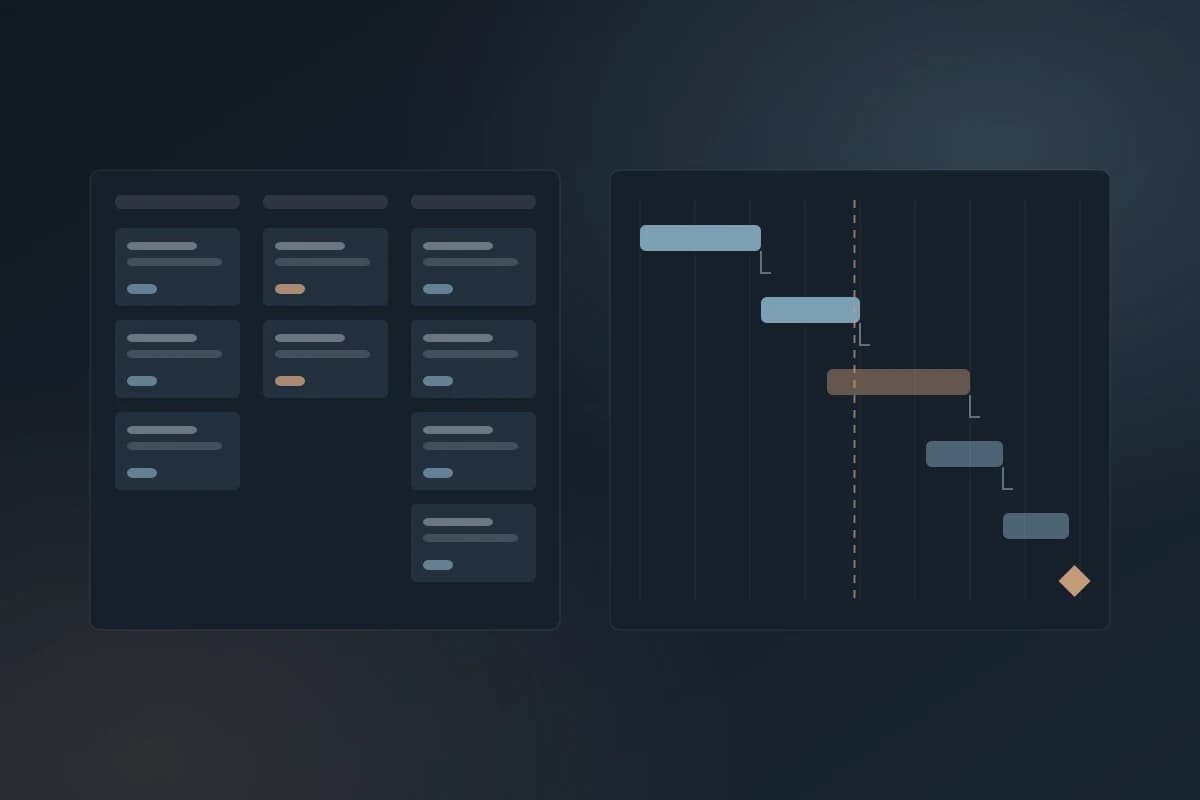
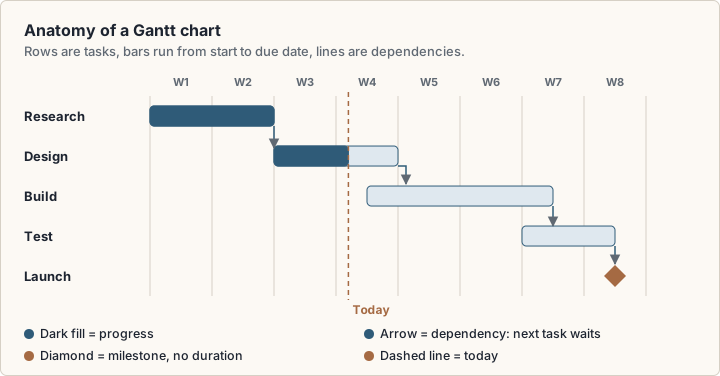
A Gantt chart is a bar chart of a schedule. Each row is a task, and each bar runs from the task's start date to its due date. Lines between bars show dependencies: task B cannot start until task A finishes. Diamonds mark milestones, which are dates with no duration.
Gantt chart software draws the chart from your task data. When one task slips, the tasks that depend on it can shift too, so you see the new end date at once.
These tools list a Gantt view on their pricing pages:
- Asana: from the Starter plan.
- monday.com: from the Standard plan.
- ClickUp: unlimited from the Core plan.
- Wrike: interactive Gantt charts from the Team plan.
- Smartsheet: on the Pro plan.
- Plane: one of five layouts on the Free plan.
- OpenProject: listed under Community features.
Jira, Trello, Linear and Notion list a timeline view instead, which may not handle dependencies. Jira says its timeline maps dependencies within one team or space. If dependencies matter, test them in a trial.
List, board and timeline views compared
Each view arranges the same work items a different way, so a change in one view shows in all of them.
- List: rows you sort and filter, for triage and backlogs.
- Board: status columns with cards you drag. This is the Kanban view.
- Timeline: bars on a date axis, for overlaps and deadlines.
- Gantt: a timeline with dependencies and milestones.
- Calendar and table: a month grid by due date, or a grid of fields for bulk edits.
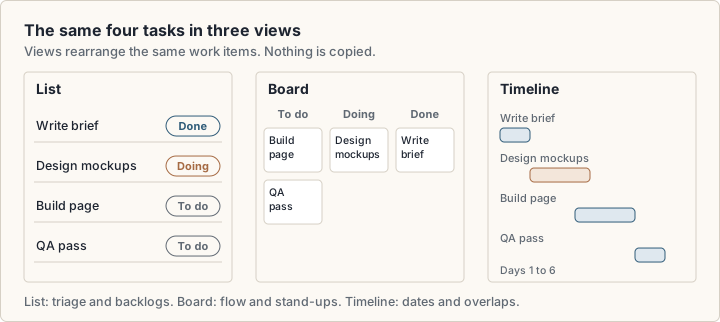
Free plans usually include list and board. Asana, monday.com, Trello and Wrike put timeline or Gantt on a paid tier. Jira lists a timeline view on its Free plan, and Plane lists a Gantt layout on its Free plan.
What are the planning tools?
Planning tools look ahead, not at today's work. In project management software they usually include these:
- Backlog: an ordered list of work not yet scheduled.
- Roadmap or timeline: a date view of projects, epics or initiatives.
- Gantt chart: a schedule with dependencies and milestones.
- Workload view: how much work each person has. Asana lists resource management within one portfolio on Advanced and organization-wide workload on Enterprise, ClickUp lists resource management on Business, and Smartsheet lists workload tracking on Business.
- Goals and portfolios: a view across many projects, such as Asana's Advanced plan or Smartsheet's Enterprise plan.
- Intake: requests arrive through a form or email and land in the backlog.
If your team only does work that someone else planned, a free board can be enough. If you set dates for other people, budget for a tier with timeline or Gantt and a workload view.
Free project management software: what each free plan includes
Eleven of the 12 tools offer a free plan or edition. Smartsheet's pricing page lists only a 30-day free trial. The free plans differ most in the limit you meet first.
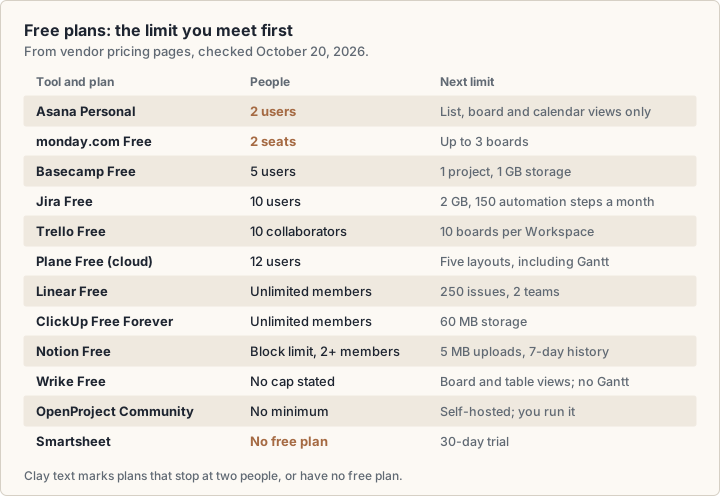
In short: Jira, Trello and Plane cover teams of 10 to 12 people. Linear and ClickUp allow unlimited members but cap issues or storage. Asana and monday.com stop at two people. The tool sections below give each free plan in full.
Free project management software online suits a very small team, or a team that only needs a board. Find the limit that would stop you, then estimate how soon you reach it. A 250-issue cap or a 3-board cap can fill in weeks.
Check before you rely on a free plan
Find out what happens at the limit. Basecamp's pricing page, for example, says you cannot downgrade from a paid package back to the free package.
Project management software pricing in October 2026
Most vendors charge per user per month, with a discount for annual billing. Basecamp charges a fixed monthly price per package, with no per-user fees.
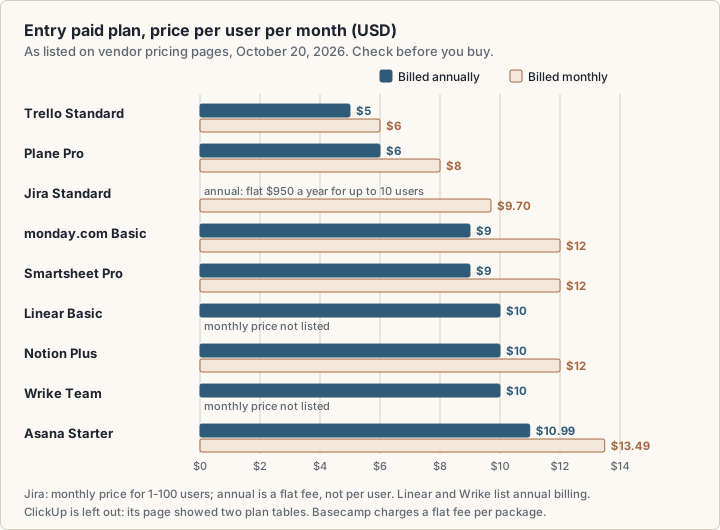
Three details change what you really pay:
- Seat minimums. monday.com's FAQ says "Plans start from 3 users." Wrike sells seats in groups of five up to 30 seats.
- Plan caps. Wrike's Team plan is for 2 to 15 users, and Smartsheet's Pro plan for 1 to 10 members.
- Annual-only billing. Linear lists paid prices as billed yearly, and Wrike's Business plan and above are annual only.
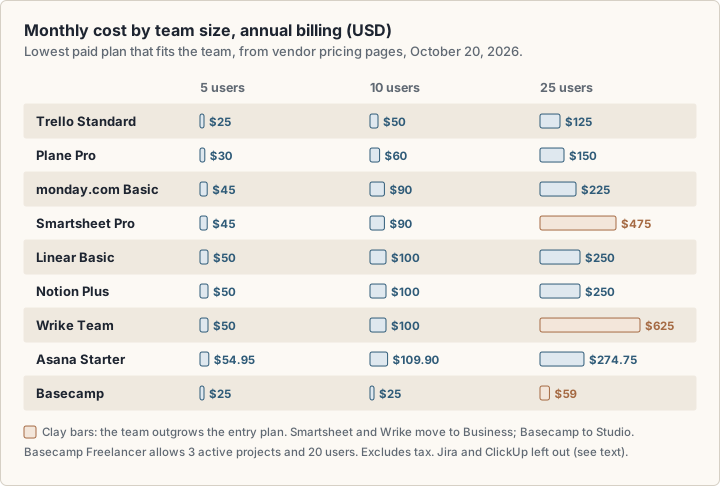
The chart uses each tool's lowest paid plan that fits the team. At 25 users, Wrike and Smartsheet move to their Business plans, so their bars jump. Basecamp's cost moves by package, but Freelancer allows only 3 active projects. ClickUp is left out because its page showed two plan tables. Jira is left out because its rate changes with user count; enter your team size on Atlassian's page for a quote.
Currency note
monday.com, Notion and OpenProject showed euro prices to European visitors. The US dollar figures for monday.com and Notion come from the USD price data on the same pages. OpenProject's prices are in euros.
Asana and monday.com
Both are work management platforms for teams across a company, with timeline and Gantt views on a paid tier.
| Feature | Asana | monday.com |
|---|---|---|
| Free plan | Personal: 2 users; list, board and calendar views | Up to 2 seats, up to 3 boards |
| Entry paid plan | Starter: $10.99 annual, $13.49 monthly | Basic: $9 annual, $12 monthly |
| Timeline and Gantt | From Starter | From Standard: $12 annual, $14 monthly |
| Automation | Unlimited automations from Starter | 250 actions a month on Standard, 25,000 on Pro |
| AI | Asana AI and AI Studio from Starter | From Basic: 1,000 credits a month; 3,000 on Pro |
| Integrations | 100+ free; Salesforce, Tableau and Power BI on Advanced | 250 integration actions a month on Standard |
Asana
Asana (opens in a new tab)'s Personal plan is free for 2 users, with unlimited tasks and projects, list, board and calendar views, and unlimited storage at 100 MB per file. Starter costs $10.99 per user per month billed annually, or $13.49 billed monthly. It adds timeline and Gantt views, dashboards, unlimited automations, forms, custom fields and free guests.
Advanced costs $24.99 annually, or $30.49 monthly. It adds goals, unlimited portfolios, resource management within one portfolio, approvals and proofing, and Salesforce, Tableau and Power BI integrations. Asana AI (AI Teammates and Asana Dash) and AI Studio are listed from Starter. Extra AI requests cost $0.50 each prepaid, or $0.60 pay-as-you-go.
What to check before you buy:
- The 2-user cap on Personal. A third person means a paid plan.
- How many AI requests your plan includes. The comparison table does not tie each allowance clearly to one plan.
- Whether you need Advanced for portfolios and workload, which more than doubles the per-user price.
monday.com
monday.com (opens in a new tab)'s Free plan covers up to 2 seats, up to 3 boards and up to 3 Docs. Its work management plans, in US dollars per seat per month, are Basic at $9 annually or $12 monthly, Standard at $12 or $14, and Pro at $19 or $24. Enterprise is quoted. The FAQ says paid plans start from 3 users, and yearly billing saves 18%.
Basic adds unlimited items and free viewers. Standard adds timeline, Gantt and calendar views, and 250 automation and 250 integration actions a month. Pro raises both to 25,000 and adds chart views. AI credits start at 1,000 a month on Basic, 2,000 on Standard and 3,000 on Pro. monday CRM and monday dev are separate products; monday dev's Standard plan lists sprint management and a GitHub integration.
What to check before you buy:
- The 3-seat minimum on paid plans, if you are a team of one or two.
- Your monthly automation and integration volume against the 250-action cap on Standard.
- Whether you need work management, CRM or dev. Each product is priced on its own.
ClickUp and Notion
Both combine tasks with docs. ClickUp starts from tasks, and Notion starts from pages and databases.
| Feature | ClickUp | Notion |
|---|---|---|
| Free plan | Unlimited members, 60 MB of storage | Unlimited blocks for one person; block limit for 2+ members |
| Entry paid plan | Core: $9 billed yearly (see note below) | Plus: $10 annual, $12 monthly |
| Gantt or timeline | Unlimited Gantt charts from Core | Timeline layout for databases |
| Automation | 1,000 a month on Core, 10,000 on Business | Buttons on Free; database automations from Plus |
| AI | Credits on every plan, from 500 per workspace on Free | Trial on Free and Plus; Notion Agent on Business |
| File uploads | 60 MB total on Free; unlimited from Core | 5 MB per file on Free; about 5 GB per file on Plus |
ClickUp
ClickUp (opens in a new tab)'s pricing page served two different plan tables on October 20, 2026. The newer table lists Free Forever, Core, Business, Enterprise and MAX. Core is $9 per user per month billed yearly (regular price $12), Business is $17 (regular price $25), and MAX is $100 (regular price $120). An older table on the same page lists Unlimited at $7 billed yearly or $10 monthly, and Business at $12 or $19. Check the plan names and prices at checkout before you commit.
Free Forever includes unlimited tasks and members, 60 MB of storage, Kanban boards, calendar view, sprint management and time tracking. On the newer table, Core adds unlimited storage and Gantt charts, custom fields and 1,000 automations a month. Business adds advanced dashboards, webhooks, 10,000 automations and resource management. ClickUp Brain credits come with every plan: 500 per workspace on Free, then 1,000 to 10,000 per user per month, pooled. Extra credits cost $10 per 10,000. The page also sells AI add-ons: Brain AI at $9 and Everything AI at $28 per user per month, so check the billing term at checkout. An upgrade applies to the whole Workspace, so every member is billed.
What to check before you buy:
- Which plan table you see at checkout, and its price.
- The 60 MB storage cap on Free. The FAQ says only file attachments count toward it.
- How many AI credits your use needs. Credits pay for agents, AI fields and AI automations.
Notion
Notion's Free plan gives one person unlimited blocks, but a workspace with 2 or more members gets a limited block count. Free also allows 10 guests, 5 MB uploads and 7 days of page history. On its pricing page (opens in a new tab), Plus costs $10 per member per month billed yearly, or $12 monthly. It adds unlimited blocks, unlimited uploads, 30 days of history, custom forms and database automations. Business costs $20 yearly or $24 monthly, and adds private teamspaces, SAML SSO, 90 days of history and bundled AI: Notion Agent, AI Meeting Notes and Enterprise Search.
For project work, Notion's databases do the job. Its help center lists seven database layouts (opens in a new tab): table, board, timeline, calendar, list, gallery and chart. A project tracker in Notion is a database that someone on your team designs and maintains. Our guide to Notion for solo founders covers database design that stays light.
Plus includes only a trial of Notion AI. Custom Agents cost $10 per 1,000 monthly Notion credits after a free trial. Plus lists basic connections such as Slack and Google Drive; Business adds GitHub and Asana.
What to check before you buy:
- The block limit, if you plan to use Free with a team.
- Whether you need AI, which moves you from Plus to Business.
- Who will build and maintain the project database.
Jira and Linear for software project management
Software project management tools are built around issues, sprints or cycles, and links to code. Our article on why startups are replacing Jira with Linear covers the workflow difference. This section covers plans and limits.
| Feature | Jira | Linear |
|---|---|---|
| Free plan | Up to 10 users, 2 GB of storage | Unlimited members, 2 teams, 250 issues |
| Entry paid plan | Standard: $9.70 billed monthly (1-100 users); $950 a year for up to 10 users | Basic: $10, billed yearly |
| Next tier | Premium: $19.60 billed monthly (1-100 users); $1,950 a year for up to 10 users | Business: $16, billed yearly |
| Views | Backlog, list, board, timeline, calendar, summary on all plans | Issues: list, board. Projects: list, board, timeline |
| AI | Rovo: 25 credits per user a month on Standard, 70 on Premium | Linear Agent on Free; Triage and Code Intelligence on Business |
| Storage | 2 GB on Free, 250 GB on Standard | 10 MB uploads on Free; unlimited on Basic |
Jira
Jira (opens in a new tab)'s Free plan is "Free forever for 10 users," with 2 GB of file storage, 150 automation steps a month for the whole subscription, 100 notification emails a day and community support. Every plan lists backlog, list, board, timeline, calendar and summary views. The timeline view maps dependencies within one team or space.
Atlassian's pricing page lists Standard at $9.70 per user per month billed monthly for 1 to 100 users, or $950 a year for up to 10 users. Premium is $19.60 per user per month billed monthly for 1 to 100 users, or $1,950 a year for up to 10 users. Jira is priced in user tiers and the rate changes above 100 users, so enter your user count on the pricing page for an exact figure. Standard raises storage to 250 GB and automation to 400 steps per user a month. Premium adds unlimited storage, 750 steps per user, cross-team planning (Plans) and Rovo Studio. Rovo, Atlassian's AI, gives 25 credits per user a month on Standard, 70 on Premium and 150 on Enterprise. Atlassian describes "thousands of integrations and apps" for Jira.
What to check before you buy:
- Your exact per-user price at your team size.
- Whether 150 automation steps a month covers your rules on Free. The steps count across the subscription, not per user.
- Whether you need Plans on Premium to see work across several teams.
Linear
Linear's Free plan has unlimited members, but it caps you at 2 teams and 250 issues, with 10 MB uploads. On its pricing page (opens in a new tab), Basic costs $10 per user per month billed yearly. It removes the issue cap, allows 5 teams and unlimited uploads, and adds admin roles. Business costs $16 per user per month billed yearly. It adds unlimited teams, private teams and guests, Insights, Asks, Triage Intelligence, Code Intelligence, and Zendesk and Intercom integrations.
Linear's display options docs (opens in a new tab) list list and board layouts for issues, and list, board and timeline layouts for projects. They do not mention a Gantt view. The Linear Agent is listed from the Free plan; coding sessions and Loops need AI credits.
What to check before you buy:
- How fast you reach 250 issues on Free. An active team can fill that in weeks.
- Whether teams outside engineering will work in Linear, or need a separate tool.
- Whether a project timeline is enough, or you need a full Gantt chart.
Trello and Basecamp: simple project management software
Trello is a board first. Basecamp gives each project a fixed set of tools at a flat price.
| Feature | Trello | Basecamp |
|---|---|---|
| Pricing model | Per user | Flat price per package, no per-user fees |
| Free plan | Up to 10 collaborators and 10 boards per Workspace | 1 project, 1 GB, up to 5 users |
| Entry paid plan | Standard: $5 annual, $6 monthly | Freelancer: $25 a month, 3 active projects, 20 users |
| Larger teams | Premium: $10 annual, $12.50 monthly | Studio $59, Pro $99, Unlimited $299 a month |
| Views beyond the board | Calendar, timeline, table, dashboard and map on Premium | Card Tables, to-dos, schedule, message boards |
| AI | AI features from Standard | ChatGPT and Claude connectors; bring your own agents |
Trello
Trello (opens in a new tab)'s Free plan allows up to 10 collaborators and up to 10 boards per Workspace, unlimited Power-Ups per board, 10 MB per file and 250 Workspace command runs a month. Command runs are Trello's automation. Standard costs $5 per user per month billed annually, or $6 monthly. It adds unlimited boards, 1,000 command runs a month, 250 MB per file and AI features.
Premium costs $10 annually, or $12.50 monthly. It adds calendar, timeline, table, dashboard and map views, and unlimited command runs. Enterprise costs $17.50 per user per month billed annually. Trello's AI features include summaries, AI-generated boards and Quick Capture, which collects to-dos and messages from email, Slack and Microsoft Teams. Trello lists 200+ app integrations, including Slack, Google Drive and Salesforce. Some partner Power-Ups charge their own fee.
What to check before you buy:
- The 10-board cap on Free, if you use one board per project.
- Whether you need timeline or calendar views, which start at Premium.
- Fees for partner Power-Ups on top of your Trello plan.
Basecamp
Basecamp (opens in a new tab) prices by package, not by person. Free gives you 1 project, 1 GB and up to 5 users. Freelancer costs $25 a month for up to 3 active projects, 5 GB and up to 20 users. Studio costs $59 a month for 10 active projects, 25 GB and unlimited users. Pro costs $99 a month for 25 active projects and 100 GB. Unlimited costs $299 a month billed annually, for unlimited projects and 1 TB. Archived projects do not count toward the active total.
Every package includes message boards, to-dos, Card Tables (Basecamp's take on Kanban), chat, scheduling, docs and files, and automatic check-ins. For AI, Basecamp lists ChatGPT and Claude connectors with MCP support, plus command-line access for your own agents.
What to check before you buy:
- Your count of active projects, which sets the package price.
- Whether you need a Gantt chart. The pricing page lists scheduling but no Gantt view.
- That you cannot move from a paid package back to Free. You would need a new free account.
Wrike and Smartsheet for date-driven planning
Both suit teams that plan on dates and report to managers. Smartsheet looks like a spreadsheet; Wrike starts from projects and tasks.
| Feature | Wrike | Smartsheet |
|---|---|---|
| Free plan | Yes: board and table views | None listed; 30-day free trial |
| Entry paid plan | Team: $10, 2 to 15 users | Pro: $9 annual, $12 monthly, 1 to 10 members |
| Next tier | Business: $25, 5 to 200 users | Business: $19 annual, $24 monthly, 3+ members |
| Gantt | Interactive Gantt charts from Team | Gantt view on Pro |
| AI | AI Essentials on Team; AI Elite starter pack on Business | Conversational AI on Pro; external AI tools on Business |
| Billing | Annual, per user; seats in groups of five up to 30 | Monthly or yearly |
Wrike
Wrike (opens in a new tab)'s Free plan includes project and task management, board and table views, and apps for web, desktop and mobile. Team costs $10 per user per month for 2 to 15 users. It adds AI Essentials (AI content and editing, comment summaries, board AI and natural-language automation rule generation), shareable dashboards and interactive Gantt charts. Business costs $25 per user per month for 5 to 200 users, and adds templates, a starter pack of AI Elite actions and standard integrations. Pinnacle and Apex are priced on request.
Prices are "billed on an annual per-user basis," and seats come in groups of five for accounts up to 30 seats. Accounts created from Europe are hosted in Paris. Add-ons include Wrike Whiteboard at $15 per user per month, and two-way sync with 22 systems, including Jira and GitHub, at custom pricing.
What to check before you buy:
- The 15-user cap on Team. At 16 users, you move to Business at $25.
- Seat groups of five. A team of 7 pays for 10 seats.
- Which add-ons you need, since several are priced on request.
Smartsheet
Smartsheet (opens in a new tab)'s pricing page lists no free plan. It offers a 30-day free trial with no credit card. Pro costs $9 per member per month billed yearly, or $12 monthly, for 1 to 10 members with unlimited free contributors. It includes Gantt, table, board and calendar views, unlimited sheets, forms and reports, conversational AI features and 250 automations a month.
Business costs $19 yearly or $24 monthly, for 3 or more members. It adds unlimited free guests, timeline view, workload tracking, unlimited automations, a connection to external AI tools and 1 TB of attachment storage. Enterprise, for 10 or more members, adds portfolios and SAML SSO. The page notes that "The Pro plan is only available to new customers."
What to check before you buy:
- The 10-member cap on Pro.
- Whether 250 automations a month on Pro covers your rules.
- The difference between members, contributors and guests, which decides who you pay for.
Open-source project management software: Plane and OpenProject
Open-source project management software lets you run the tool on your own servers. Both options here also sell a hosted cloud version.
| Feature | Plane | OpenProject |
|---|---|---|
| Free edition | Open source and self-hostable, per its FAQ | Community edition: free, no minimum users |
| Free cloud plan | Free: up to 12 users | 14-day trial of the Enterprise cloud |
| Paid plans | Pro $6 annual ($8 monthly); Business $13 ($15) | Basic €5.95, Professional €10.95, Premium €15.95 |
| Gantt | One of five layouts on Free | In the Community features section |
| Minimums | None listed | Basic card says 25 (label says at least 5; confirm at checkout), Professional 25, Premium 100; sold in steps of 5 |
| Migration | Importers for one Jira or Asana project at a time | Jira migration listed in its feature table |
Plane
Plane (opens in a new tab)'s cloud Free plan costs nothing for up to 12 users. It includes projects and work items, cycles and modules, intake, estimates, project pages, and five layouts: list, board, calendar, Gantt and spreadsheet. Pro costs $6 per seat per month billed annually, or $8 monthly, and adds 500 AI credits per seat, a wiki, time tracking, dashboards and integrations. Business costs $13 annually, or $15 monthly, and adds 1,000 AI credits per seat, project templates, recurring work items and email intake. AI credits are per seat, not pooled, and do not roll over. Plane's FAQ says it "is open-source and can be self-hosted on your own infrastructure."
What to check before you buy:
- The 12-user cap on the cloud Free plan.
- Which features the self-hosted edition includes compared with the cloud plans.
- Who on your team patches and backs up a self-hosted instance.
OpenProject
OpenProject (opens in a new tab)'s Community edition is free and open source, with no minimum users and community support. Its feature table lists Gantt charts and timelines, and basic agile boards, under Community features. Paid Enterprise plans run on your own servers or in OpenProject's cloud. In euros per user per month, Basic is €5.95, Professional is €10.95 with a 25-user minimum, and Premium is €15.95 with a 100-user minimum. The Basic card lists 25 minimum users while its label says at least 5 users, so confirm the minimum at checkout. Corporate starts at 250 users.
You buy users in steps of 5. A 14-day trial covers the Enterprise cloud, or a license key that upgrades a self-hosted Community install.
What to check before you buy:
- Whether the Community edition covers your needs.
- The user minimums on Professional and Premium.
- Your price in your currency; the page has a US dollar view.
Cloud-based or self-hosted?
Cloud-based project management software runs on the vendor's servers. You sign in through a browser or an app, and the vendor handles updates, backups and uptime. Most tools in this guide are sold this way. Wrike's FAQ, for example, says it is "entirely cloud-based."
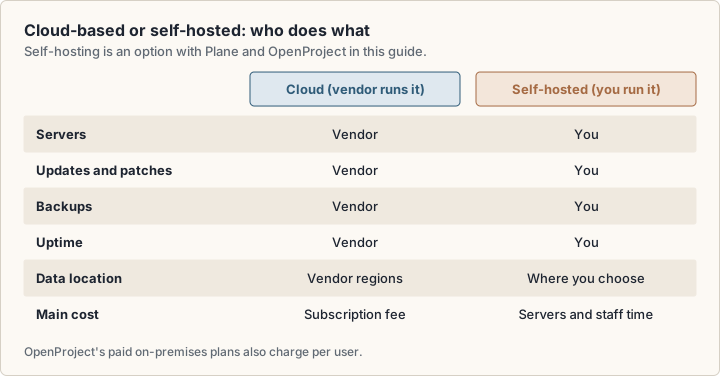
Self-hosting moves that work to you. You control where data lives, and you take on servers, patches, backups and monitoring. Self-host when a rule or a customer requires it, or when you already run servers well.
AI project management software: what the AI features cost
Eleven of the 12 vendors in this guide list AI features (OpenProject lists no AI pricing): summaries, drafted tasks, plain-language search and agents that act on work items. The useful question is how each vendor meters it.
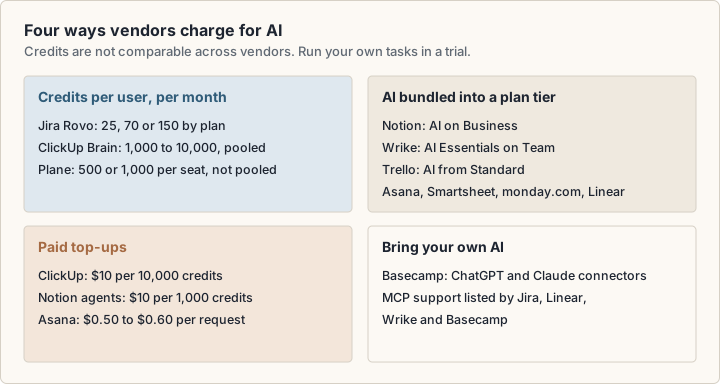
- Credits per user per month: Jira (Rovo), ClickUp (pooled) and Plane (per seat, not pooled).
- AI bundled into a tier: Notion on Business, Wrike on Team, Trello from Standard, and tier-based AI at Asana, Smartsheet, monday.com and Linear.
- Paid top-ups: ClickUp at $10 per 10,000 credits, Notion agents at $10 per 1,000 credits, Asana at $0.50 to $0.60 per request.
- Bring your own AI: Basecamp lists ChatGPT and Claude connectors instead of a built-in assistant.
Jira, Linear, Wrike and Basecamp also list MCP (Model Context Protocol) support, which lets an outside AI assistant read and update your projects.
Credits are not comparable across vendors. To compare, run your own common tasks during a trial and read the usage report.
Check the data terms
Ask where your project data goes when AI features run, and whether it is kept. Notion's Enterprise plan, for example, lists zero data retention with LLM providers.
How to choose project management software for your team
Start from your method and team size, then work down to features. The tree gives starting points for a trial, based on listed features. It is not a recommendation.
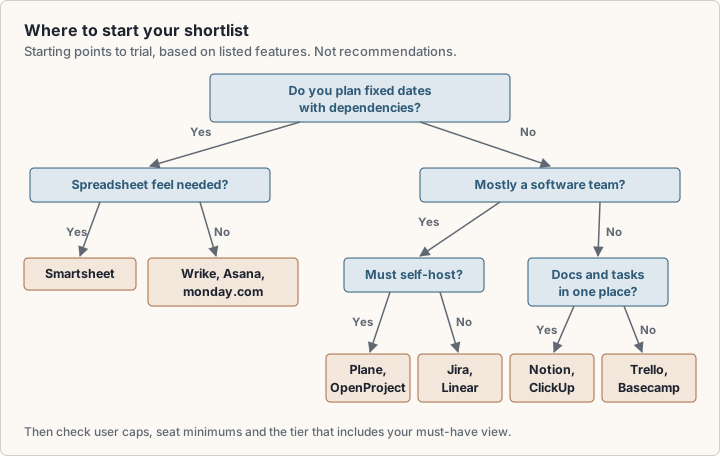
- 1Name your method: a dated plan, sprints or continuous flow.
- 2Count users now and in 12 months, and check caps and minimums at both numbers.
- 3List the views you need daily, and the tier that includes Gantt if you need it.
- 4Estimate how many automation runs you need a month.
- 5List must-have integrations: chat, code, calendar, CRM.
- 6Run a two-week trial with real work and real users.
- 7Check export formats and what happens to your data if you downgrade.
Startups and small businesses
For a startup or small business, the first cap you reach can matter as much as the per-seat price. A 2-user free plan, a 3-seat minimum or a 250-issue limit sets your real first-year cost. Plan for the team you expect in 12 months.
Spreadsheet or project management software?
A spreadsheet works for one person and one project. It stops working when several people edit at once or need reminders. If your tracker is really a database, Airtable sits between a spreadsheet and a project management app. Smartsheet keeps the grid and adds Gantt and board views.
How to read best rated project management software lists
A search for the best rated project management software returns review-site ratings and ranked lists. Both help if you know what they measure.
G2 publishes its scoring method (opens in a new tab). Its Satisfaction score comes from review answers, with ease of use, meeting requirements, quality of support, review volume and recency weighted highly. Its Market Presence score uses review counts, employee and revenue estimates, and web metrics. G2 calls the result a standardized score used to compare products in the same category, so a score only compares products inside that category.
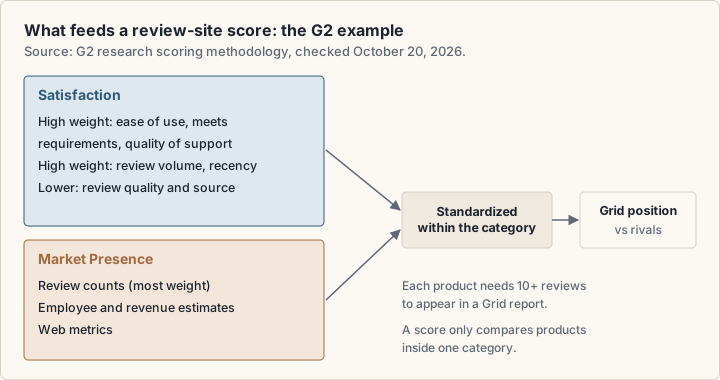
G2 requires at least 10 reviews per product for a Grid report. It also states that reviews are subjective and that it has "not reviewed or confirmed" reviewers' professional qualifications.
To read any rating or ranked list:
- Read reviews from teams of your size and industry.
- Check review dates. A rating from before a plan change may describe a different product.
- Note who wrote the list. In our check of Google's US results on 20 October 2026, five of the eight first-page results were ranked lists, each published by a project management vendor.
- Look for the scoring rules. Without them, you cannot weigh the order.
Frequently asked questions
Is there free project management software for a small team?
Yes. Jira's Free plan covers up to 10 users, Trello's up to 10 collaborators per Workspace, and Plane's cloud Free plan up to 12 users. Linear and ClickUp allow unlimited members but cap issues and storage.
Which project management software works on a Mac?
Check each vendor's page for a Mac app or browser support. Wrike, for example, lists apps for Windows, Mac, iPhone and Android.
Can project management software replace a CRM?
Usually it connects to a CRM instead. monday.com sells monday CRM separately, from $12 per seat per month billed annually. Asana's Advanced plan and Trello list Salesforce integrations.
Can I manage projects in Excel?
You can, for a small project with one owner. A spreadsheet has no reminders, per-person views or automation. If you like the grid, Smartsheet keeps it and adds Gantt and board views on the same rows.
Sources
- Asana pricing (opens in a new tab)
- monday.com pricing (opens in a new tab)
- ClickUp pricing (opens in a new tab)
- Jira pricing (Atlassian) (opens in a new tab)
- Trello pricing (opens in a new tab)
- Notion pricing (opens in a new tab)
- Notion help: views, filters and sorts (opens in a new tab)
- Linear pricing (opens in a new tab)
- Linear docs: display options (opens in a new tab)
- Wrike pricing (opens in a new tab)
- Smartsheet pricing (opens in a new tab)
- Basecamp pricing (opens in a new tab)
- Plane pricing (opens in a new tab)
- OpenProject pricing (opens in a new tab)
- The 2020 Scrum Guide (opens in a new tab)
- The Kanban Guide (May 2025) (opens in a new tab)
- Manifesto for Agile Software Development (opens in a new tab)
- GOV.UK Service Manual: agile and waterfall (opens in a new tab)
- G2 research scoring methodologies (opens in a new tab)