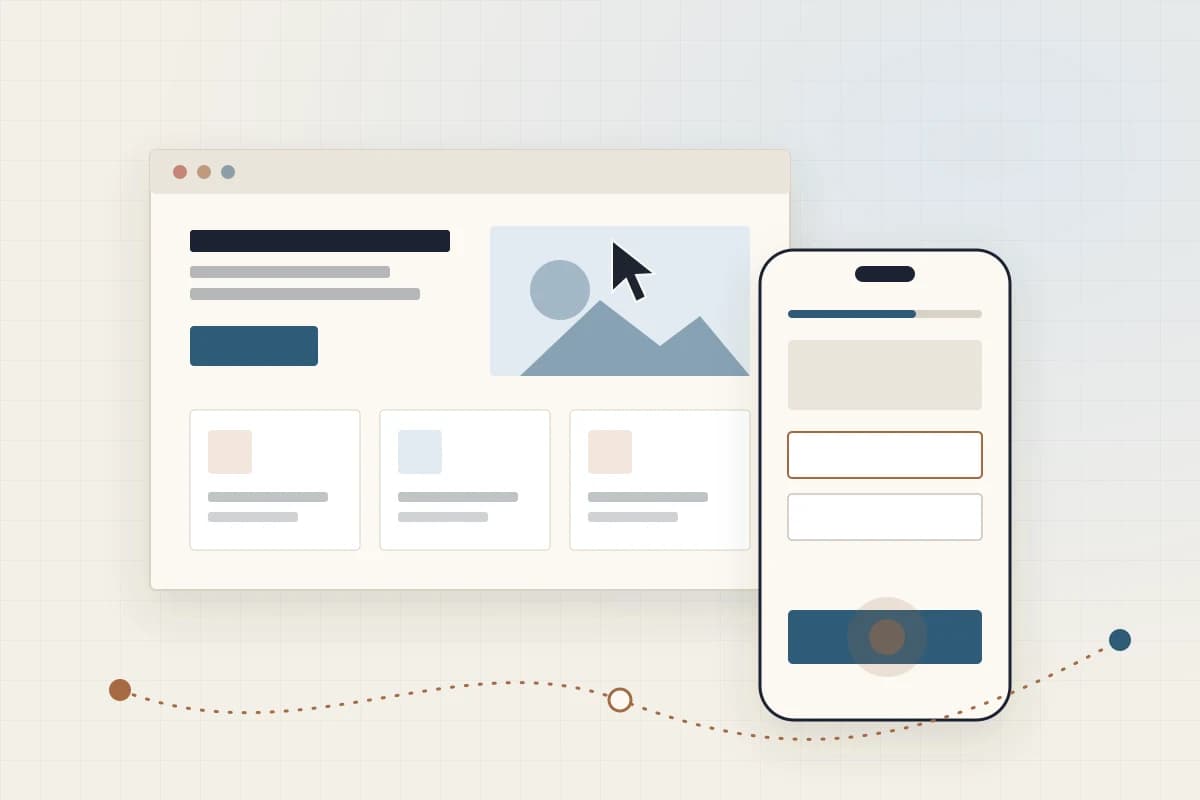
UI UX design is two related jobs. UX (user experience) design decides what a product should do for people, and in what order. UI (user interface) design decides how each screen looks, reads and responds. This guide defines both, works through one screen as an example, and answers the common questions about pay, learning and careers.
What is UI and UX design?
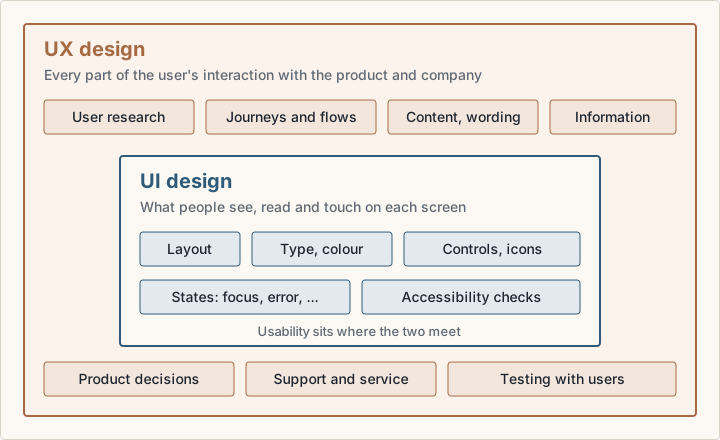
Don Norman and Jakob Nielsen of Nielsen Norman Group (NN/g) define user experience as covering "all aspects of the end-user's interaction with the company, its services, and its products" (NN/g (opens in a new tab)). That reaches past the screen, to whether the product has what the user came for and how support answers.
The user interface is the part a person sees and touches: layout, type, colour, icons, controls, and the states each control can show, such as focus, error and loading. The US Bureau of Labor Statistics (BLS) describes digital designers as people who "develop, create, and test website or interface layout, functions, and navigation for usability" (BLS (opens in a new tab)).
So what does UI UX design mean in one line? UX decides which steps exist and why; UI decides how each step looks and behaves. In small teams one person often does both, so the job titles merge.
UI vs UX design: what's the difference?
The difference between UX and UI design is scope. NN/g's example: a film review site can have a well-designed search, but if its database lacks the independent film you want, the experience is still poor (NN/g (opens in a new tab)). Interface polish cannot fix a missing product decision.
| Feature | UX design | UI design |
|---|---|---|
| Core question | Does this solve the user's problem, in a sensible order? | Can the user see, read and operate each step? |
| Typical outputs | Research notes, journey maps, flows, wireframes, test findings | Visual designs, components, type and colour scales, interaction states |
| Measured by | Task success, drop-off between steps, support requests | Legibility, consistency, accessibility conformance |
| Typical failure | The right screens in the wrong order, or a feature nobody needs | A correct flow that is hard to read, tap or scan |
The two meet at usability. NN/g treats usability as a quality of the interface, meaning how easy it is to learn and use, and treats UX as the broader concept.
The UI UX design process
Most teams follow a human-centred design loop. The standard ISO 9241-210:2019, "Human-centred design for interactive systems", gives requirements and recommendations for human-centred design across a system's life cycle (SNV catalogue entry (opens in a new tab)). NN/g's design thinking framework gives a practical shape: six phases in three stages (NN/g (opens in a new tab)).
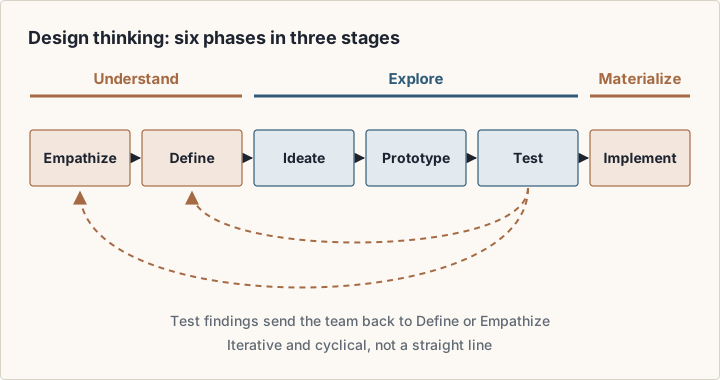
- 1Empathize: learn who the users are and what they try to do.
- 2Define: turn that into a clear problem statement.
- 3Ideate: generate several solutions before you commit to one.
- 4Prototype: build something cheap enough to throw away.
- 5Test: put the prototype in front of real users and watch where they struggle.
- 6Implement: ship it, then keep measuring.
NN/g calls the phases iterative and cyclical, not linear. Its UX research cheat sheet maps methods to the work: field studies and user interviews to discover, task analysis and card sorting to explore, usability testing and accessibility evaluation to test, and surveys and analytics review to listen after launch (NN/g (opens in a new tab)). For the listening phase, see our guide to product analytics with PostHog and Plausible.
Principles of UI UX design
The most cited principles are Jakob Nielsen's 10 usability heuristics. Nielsen developed them with Rolf Molich in 1990 and refined them in 1994. NN/g updated the wording and examples in 2020, but the heuristics have stayed essentially the same (NN/g (opens in a new tab)). Use them as a review checklist for any screen.
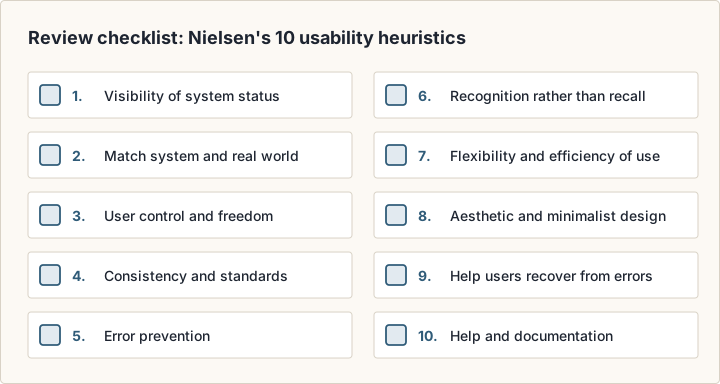
- 1Visibility of system status: give prompt feedback on what is happening.
- 2Match between the system and the real world: use the user's words.
- 3User control and freedom: give a clear way to exit or undo.
- 4Consistency and standards: follow platform conventions.
- 5Error prevention: remove error-prone conditions, or confirm first.
- 6Recognition rather than recall: keep options visible.
- 7Flexibility and efficiency of use: offer shortcuts for experts.
- 8Aesthetic and minimalist design: show only what is relevant.
- 9Help users recognize, diagnose, and recover from errors: say what went wrong in plain language, and how to fix it.
- 10Help and documentation: make help easy to search and task-focused.
Accessibility is a principle, not a final check
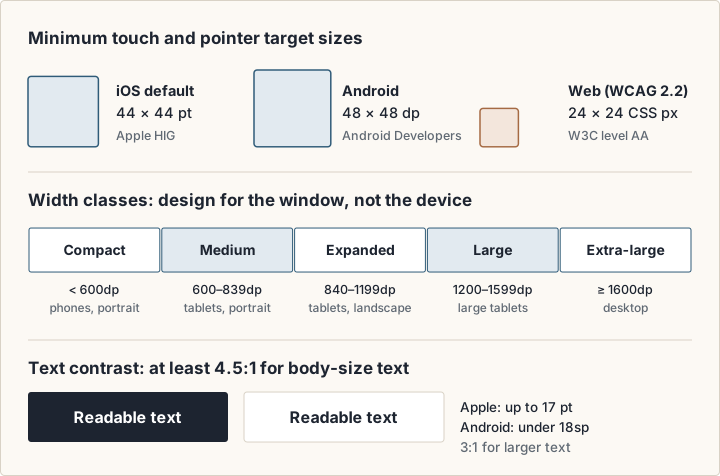
The Web Content Accessibility Guidelines (WCAG) from the W3C are the technical standard for accessible web content. WCAG 2.2 was published on 5 October 2023 and updated on 12 December 2024. Its guidelines sit under four principles, perceivable, operable, understandable and robust, with testable success criteria at levels A, AA and AAA (W3C (opens in a new tab)). WCAG 2.2 added nine success criteria, among them Target Size (Minimum): pointer targets of at least 24 by 24 CSS pixels, with listed exceptions (W3C (opens in a new tab)).
A worked example: one checkout screen
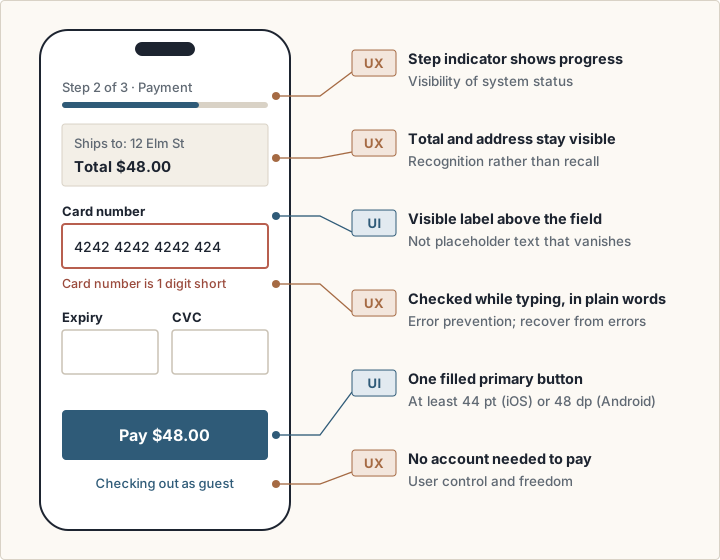
Take the payment step of a mobile checkout. Each decision below is tagged UX or UI, with the heuristic or guideline it follows.
UX decisions
- Offer guest checkout, so a first-time buyer can pay without an account (user control and freedom).
- Show a step indicator, such as Step 2 of 3 (visibility of system status).
- Keep the order total and address visible, so the buyer does not have to remember them (recognition rather than recall).
- Check the card number as the buyer types, not after they press Pay (error prevention). Do not ask again for an address already entered: WCAG 2.2 added a Redundant Entry criterion for this.
UI decisions
- Make Pay the only filled button, so the primary action is clear (aesthetic and minimalist design).
- Size tappable controls to at least 44 by 44 points on iOS or 48 by 48 dp on Android.
- Put a visible label above each field, not placeholder text that disappears when the user types.
- Write the error next to the field in plain words, such as "Card number is 1 digit short", not a red border alone.
- Keep body text contrast at 4.5:1 or higher.
Neither list works alone. A clear Pay button does not help a buyer forced to register first, and guest checkout does not help a buyer who cannot read the error.
UI UX design for mobile apps
Mobile design adds physical limits: a small screen, a finger instead of a cursor, hardware that covers parts of the display, and text sizes the user controls. Apple and Google both publish rules for them.
Apple's Human Interface Guidelines define a safe area as the part of a window not covered by a hardware feature or by views such as a toolbar, tab bar or status bar. Respecting it keeps hardware such as the Dynamic Island from blocking content. Apps should also adapt to Dynamic Type, for example by stacking side-by-side views when text grows (Apple HIG: Layout (opens in a new tab)). Apple lists a default control size of 44 by 44 points on iOS and iPadOS, with 28 by 28 points as the minimum, a contrast ratio of at least 4.5:1 for text up to 17 points, and text that people can enlarge by at least 200 percent (Apple HIG: Accessibility (opens in a new tab)).
Google's Android guidance recommends touch targets of at least 48 by 48 dp. It asks for a contrast ratio of at least 4.5:1 for text smaller than 18sp, or bold text smaller than 14sp, and 3:1 for other text. Material components in Jetpack Compose, such as Button, already enforce the minimum size; custom controls need it set by hand (Android Developers (opens in a new tab)).
Web UI/UX design
Website UI/UX design has to work at every width, and with a mouse, a keyboard and a finger. Three habits cover most of it.
- Design for the window, not the device. Android's window size classes are a useful reference: compact below 600dp, medium from 600dp, expanded from 840dp, large from 1200dp, and extra-large from 1600dp. Google notes that the classes are not determined by the device's screen size (Android Developers (opens in a new tab)).
- Support the keyboard. Every interactive element needs a visible focus state, and WCAG 2.2 added Focus Not Obscured (Minimum) at level AA, so a sticky header must not hide the focused element.
- Size targets for pointer and touch. WCAG 2.2 sets 24 by 24 CSS pixels as the AA minimum; Android notes that targets for a mouse or trackpad can be smaller than touch targets.
If you design marketing sites, our Framer vs Webflow comparison covers two builders that publish web designs without hand-coding.
UI UX design trends with a source behind them
Many trend lists repeat visual fashions. These four shifts each have a dated primary source.
- Accessibility is law in more markets. The European Accessibility Act, Directive (EU) 2019/882, applies to services provided to consumers after 28 June 2025, including e-commerce (EUR-Lex (opens in a new tab)). WCAG 2.2 is also the international standard ISO/IEC 40500:2025 (W3C (opens in a new tab)).
- Layouts must stretch further. Android added large and extra-large width classes to better target desktop and connected displays (Android Developers (opens in a new tab)).
- Translucent system materials. On 9 June 2025, Apple previewed iOS 26 with Liquid Glass, "a new translucent material that reflects and refracts its surroundings" (Apple Newsroom (opens in a new tab)). Check text contrast over moving backgrounds.
- AI inside design tools. Figma lists Figma Make as "Prompt to code anything you can imagine" (Figma (opens in a new tab)), and Framer calls itself "the design agent for every step from idea to launch" (Framer (opens in a new tab)). Research and testing still decide whether the result works.
Tools you will meet
Process matters more than tool choice, but beginners ask. These descriptions come from each vendor's site as of October 2026; check the vendor page for current features and prices.
- Figma: Figma Design to "Design and prototype in one place", Dev Mode to "Translate designs into code", and FigJam, a digital whiteboard (figma.com (opens in a new tab)).
- Mobbin: a library of "real screens, flows, UI patterns, and website sections from shipped digital products" (mobbin.com (opens in a new tab)).
- Principle: a native macOS app for animated and interactive interfaces, listed at $129 (principleformac.com (opens in a new tab)).
- Framer: a site design and publishing tool that includes hosting, CMS, analytics and SEO (framer.com (opens in a new tab)).
Is UI/UX design well paid?
In the United States, the BLS Occupational Outlook Handbook covers this work under web developers and digital designers. It reports a median annual wage of $104,000 for web and digital interface designers in May 2025, against $92,650 for web developers and $99,520 for both groups combined (BLS (opens in a new tab)).
BLS counts 132,700 web and digital interface designer jobs in 2025, and projects 5 percent growth for the combined group from 2025 to 2035, which it rates faster than average. A median is not a starting salary, and these are US figures: pay elsewhere and at entry level can be very different.
Is UI/UX design an IT job?
For statistics, yes: BLS lists web developers and digital designers among its Computer and Information Technology occupations. Day to day, the work is closer to research and design: you talk to users, map flows and test prototypes. Code is not the core of the role, but knowing what HTML, CSS and platform components can do makes your designs easier to build.
How to learn UI/UX design as a beginner
BLS lists a bachelor's degree as typical, but notes that requirements range from a high school diploma to a bachelor's degree, and that candidates can show their abilities through prior work or projects. So build the plan around a portfolio. Adapt this 12-week plan to your pace.
- 1Weeks 1 to 2: read the NN/g definition of UX and the 10 heuristics. Review three apps you use daily against them.
- 2Weeks 3 to 4: learn one design tool, such as Figma, well enough to build components and a clickable prototype.
- 3Weeks 5 to 6: read the Apple and Android accessibility guidance and the WCAG 2.2 overview. Redesign one screen to meet their rules.
- 4Weeks 7 to 9: run one project end to end. Interview a few people, define one problem, prototype a fix, and test it.
- 5Weeks 10 to 11: repeat on the other platform. Study comparable flows in a reference library such as Mobbin.
- 6Week 12: write each project up as a case study: the problem, what users taught you, what you changed, and why.
Portfolio tip
Show the process, not only the final screens. A failed test and the change it caused tells a hiring team more than a polished mock-up.
Frequently asked questions
What exactly is UI and UX design?
UX design shapes the whole experience of using a product: what it does and the steps it takes. UI design shapes the screens: layout, type, colour and controls. UX asks whether this is the right thing to build; UI asks whether people can see and operate it.
Is UI/UX design the same as graphic design?
No. UI design shares visual skills with graphic design, but UI work is interactive: every control has states and must meet target-size and contrast rules. UX goes further, into research, flows and testing.
Which comes first, UX or UI?
UX usually leads, because research and flows decide which screens exist. In practice the two run in loops: testing a UI prototype often changes the flow.
Sources
- Nielsen Norman Group: The Definition of User Experience (UX) (opens in a new tab)
- Nielsen Norman Group: 10 Usability Heuristics for User Interface Design (opens in a new tab)
- Nielsen Norman Group: Design Thinking 101 (opens in a new tab)
- Nielsen Norman Group: UX Research Cheat Sheet (opens in a new tab)
- ISO 9241-210:2019, Human-centred design for interactive systems (SNV catalogue entry) (opens in a new tab)
- W3C: WCAG 2 Overview (opens in a new tab)
- W3C: What's New in WCAG 2.2 (opens in a new tab)
- Apple Human Interface Guidelines: Layout (opens in a new tab)
- Apple Human Interface Guidelines: Accessibility (opens in a new tab)
- Android Developers: Make apps more accessible (opens in a new tab)
- Android Developers: Use window size classes (opens in a new tab)
- US Bureau of Labor Statistics: Web Developers and Digital Designers (opens in a new tab)
- EUR-Lex: Directive (EU) 2019/882 on the accessibility requirements for products and services (opens in a new tab)
- Apple Newsroom: iOS 26 preview, 9 June 2025 (opens in a new tab)