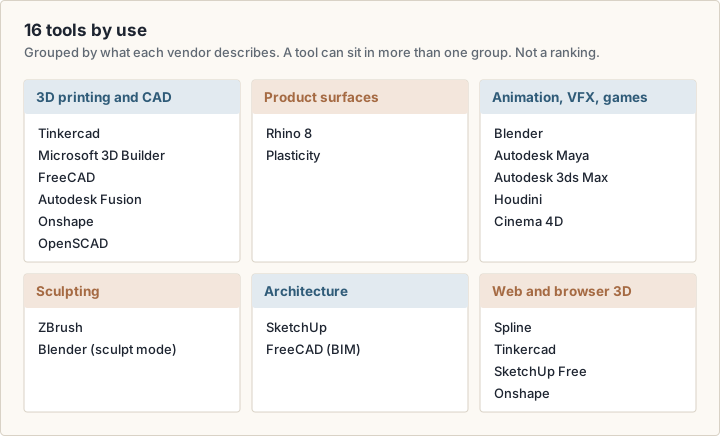
3D modeling software covers several different jobs. A 3D-printed bracket, a game character and a kitchen layout each call for a different kind of tool. This guide compares 16 options by the work you want to do, from free open-source programs to subscriptions.
listing.sh did not test these tools hands-on. Every price, limit and feature below comes from the vendor's own website, checked on October 20, 2026. Where we could not read a USD price, the guide says so and links the page. Confirm each figure on the vendor page before you buy.
How to read the prices
Prices are in US dollars, as of October 2026, and exclude tax. Monthly figures are billed annually unless a line says otherwise. A license you buy once is marked as a one-time price.
What is 3D modeling software?
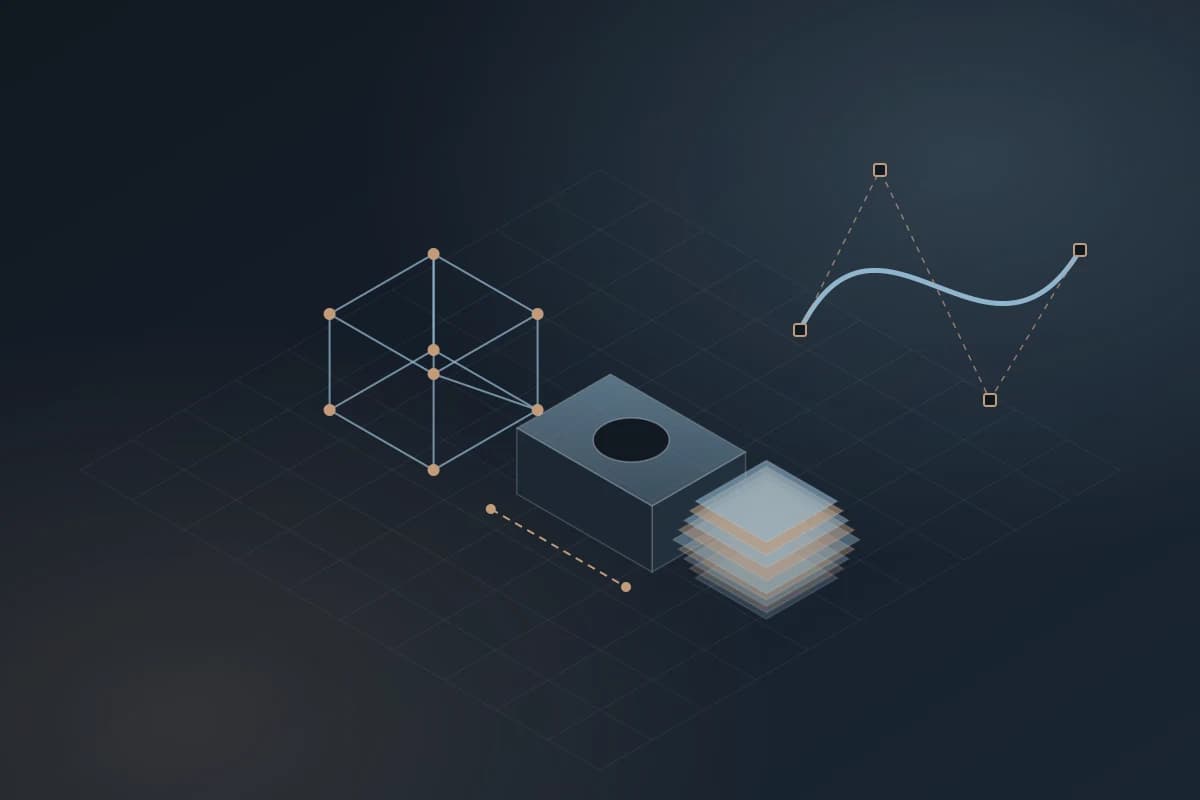
3D modeling software builds a digital description of an object's shape. The Blender manual calls modeling "the art and science of creating a surface" that mimics a real object or expresses an abstract one (Blender manual (opens in a new tab)). What differs between tools is how they store and edit that shape. Five approaches cover almost every program in this guide.
- Polygon mesh: the shape is a net of points, edges and faces. Blender edits meshes, and most animation and game tools are built around them.
- Parametric solid (CAD): you draw a constrained 2D sketch and turn it into a solid. FreeCAD describes this as going "back into your model history" to change a parameter. Fusion, Onshape and FreeCAD work this way. It suits parts that must fit and be measured.
- NURBS surfaces: shapes are mathematically smooth curves and surfaces. Rhino (opens in a new tab) creates and edits NURBS curves, surfaces and solids, and Plasticity is built on the xNURBS and Parasolid kernels.
- Digital sculpting: you push and pull a dense mesh like clay. ZBrush is built around it, and Blender has a sculpt mode.
- Code and CSG (constructive solid geometry): you write a script that adds and subtracts primitive shapes. OpenSCAD (opens in a new tab) works this way and calls itself "something like a 3D-compiler".
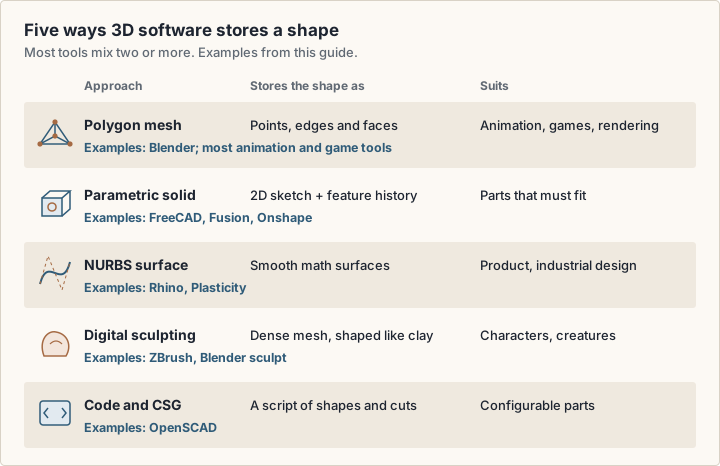
Most programs mix approaches: Blender, for example, edits meshes, curves and surfaces and has a sculpt mode. Start from the approach your output needs, then look at tools.
What is 3D CAD design?
Autodesk defines 3D CAD, or three-dimensional computer-aided design, as technology that "replaces manual drafting with an automated process" for design and technical documentation (Autodesk (opens in a new tab)). In practice, CAD models carry exact dimensions and can feed manufacturing: 2D drawings, CNC machining (CAM) and 3D printing.
16 options at a glance
The table lists every tool in this guide with its free option and its lowest paid price. It is not a ranking. The tools do different jobs, so compare within a use, not across the whole list.
| Feature | Free option | Paid entry price (USD) |
|---|---|---|
| Blender | Free and open source (GPL), any use | None, donations only |
| FreeCAD | Free and open source, no sign-up | None |
| OpenSCAD | Free software (GPL v2) | None |
| Tinkercad | Free web app | None |
| Microsoft 3D Builder | Free on the Microsoft Store (Windows) | None |
| SketchUp | SketchUp Free in the browser | Go: $10.75/month, billed annually |
| Autodesk Fusion | Personal use: non-commercial, under $1,000 revenue | $57/month, billed annually |
| Onshape | Free plan: non-commercial, documents are public | Standard: $1,500 per user per year |
| Rhino 8 | 90-day evaluation | $995 one-time (commercial) |
| Plasticity | 30-day trial | Indie: $175 one-time |
| Autodesk Maya | Free trial | Listed as starting at $168/month |
| Autodesk 3ds Max | Free trial | Listed as starting at $168/month |
| Houdini | Apprentice: non-commercial, watermarked | Indie: $299 for 1 year |
| Cinema 4D | Trial on Maxon's site | Not readable in USD, see Maxon |
| ZBrush | Trial on Maxon's site | Not readable in USD, see Maxon |
| Spline | Free plan, web exports carry a watermark | Hobby: $12/month, billed yearly |
Free 3D modeling software
Free 3D modeling software comes in two kinds. Open-source and freeware programs are free with no conditions on what you make. Free tiers of commercial products are free with conditions: no commercial use, public files, a watermark or a time limit. Read the condition before you build a business on a free tier.
Free with no conditions on use
- Blender (opens in a new tab): released under the GNU General Public License. Blender states you are "free to use Blender, for any purpose", including commercial work, and that "what you create with Blender is your sole property".
- FreeCAD (opens in a new tab): an open-source parametric modeler for "real-life objects of any size". The project states "no licensing fees" and "no sign-up, no paywall, no restrictions". The current stable version is 1.1.4 (downloads page (opens in a new tab)).
- OpenSCAD (opens in a new tab): free software under GPL version 2, for Linux, Windows and Mac. You model in a script, not with a mouse.
- Tinkercad (opens in a new tab): a free web app from Autodesk for 3D design, electronics and coding. It needs no download, and the site describes it as ad-free and kidSAFE-certified.
- Microsoft 3D Builder (opens in a new tab): listed on the Microsoft Store at no cost, for Windows. It opens 3MF, STL, OBJ, PLY, WRL and glTF files, saves 3MF, STL, PLY and OBJ, and can repair a model so it prints.
Free with conditions
- Autodesk Fusion for personal use (opens in a new tab): free for one year at a time for home-based, non-commercial projects, for individuals earning under $1,000 USD a year. It has limited CAM, limited 2D drawings and limited import and export file types.
- Onshape Free (opens in a new tab): for non-commercial use only, and "all Onshape Documents are accessible to the public". Anyone can see what you design.
- SketchUp Free (opens in a new tab): SketchUp's core modeler in the browser, with 10 GB of Trimble Connect cloud storage. It imports SKP, JPG and PNG and exports SKP, PNG and STL. Check SketchUp's terms before you use it for paid work.
- Houdini Apprentice (opens in a new tab): free for personal non-commercial projects. It can "save to disk and render out with a watermark".
- Spline Free (opens in a new tab): limited personal files, and web exports carry a watermark.
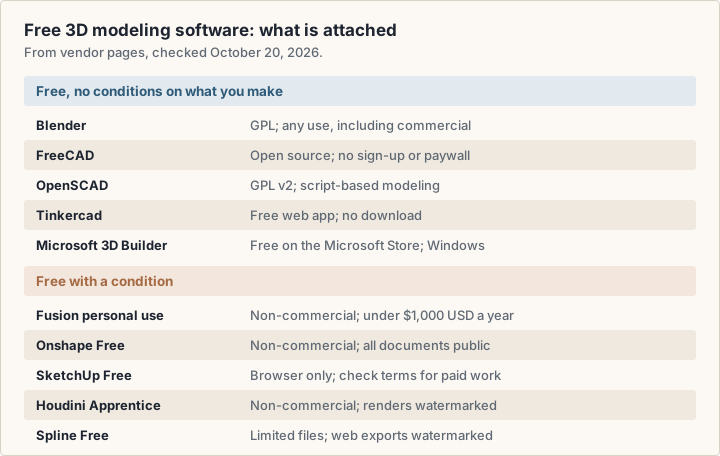
Trials are a third kind of free. Rhino offers a 90-day evaluation, after which "saving and plugins stop working" (Rhino (opens in a new tab)). Plasticity offers 30 days, and Fusion has a 30-day trial of the full product. A trial suits a planned evaluation, not an ongoing free tool.
Options for 3D printing and CAD
For a part that must fit something real, such as a bracket, an enclosure or a replacement knob, use a tool that works in exact dimensions. Six tools in this guide are built for it.
- Tinkercad (opens in a new tab): you combine ready-made shapes and type exact sizes with a ruler, for "precise 3D printing".
- Microsoft 3D Builder (opens in a new tab): repairs models so they print, and can emboss a name or add a base.
- FreeCAD (opens in a new tab): sketch-based parametric modeling with production drawings. It reads and writes STEP, IGES, STL, SVG, DXF, OBJ, IFC and DAE, and has workbenches for FEA (finite element analysis), CAM and CNC.
- Autodesk Fusion (opens in a new tab): CAD, CAM, CAE (simulation) and PCB design in one product, at $57 a month billed annually. The personal-use version covers hobby work within its limits.
- Onshape (opens in a new tab): parametric CAD that runs in a web browser, with no software to install. Standard costs $1,500 per user per year and adds private documents. Professional, at $2,500, adds simulation, rendering, CAM and PCB tools.
- OpenSCAD (opens in a new tab): for parts defined by numbers, such as a box with configurable wall thickness.
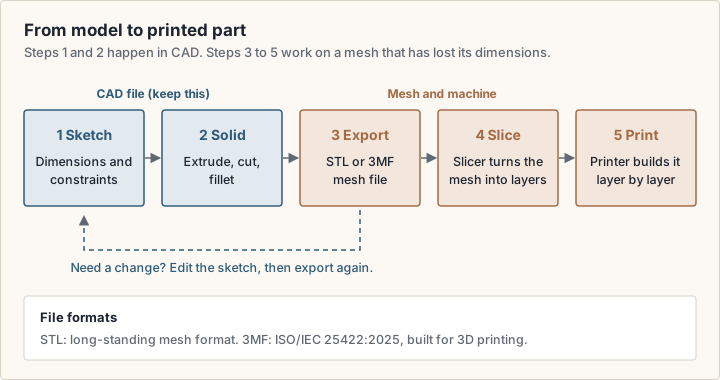
Most printing workflows export a mesh file for the slicer. STL is the long-standing format. The 3MF Consortium built 3MF to fix the limitations of older formats, and it is now the international standard ISO/IEC 25422:2025 (3MF Consortium (opens in a new tab)). Your slicer, the program that turns the mesh into printer layers, decides which formats you can use, so check it first.
Keep the source file
Save the native CAD file, not only the STL. A mesh export loses the sketch and dimension history, so a later change means remodeling.
Options for product and industrial design
Vehicles and consumer products often need smooth, flowing surfaces that are hard to build from a sketch-and-extrude history. Two tools here focus on that kind of form, and both sell a license you keep.
- Rhino 8 (opens in a new tab): a NURBS modeler for Windows and Mac. The North America store lists a single commercial license at US$995, an upgrade from any older version at US$595, and a student or faculty license at US$195.
- Plasticity (opens in a new tab): a direct modeler built on the Parasolid and xNURBS geometry kernels, for macOS, Windows and Linux. Indie costs $175 and Studio $299, each a perpetual license with 12 months of updates. Both allow commercial use. Indie runs on up to 2 machines and imports and exports STEP, OBJ, STL and Parasolid. Studio runs on up to 4 and adds IGES, Rhino import and more.
Plasticity describes itself as "a powerful complement to other CAD tools", not a replacement for history-based CAD. If you plan to move a model between tools, check the import and export formats each one lists before you commit.
Options for animation, VFX and game assets
Animation, visual effects (VFX) and game work need meshes, plus rigging, animation, simulation and rendering. These tools cover that pipeline. The prices differ by an order of magnitude.
- Blender (opens in a new tab): free, and its feature page lists "the entirety of the 3D pipeline": modeling, rigging, animation, simulation, rendering, compositing, motion tracking, video editing and game asset creation.
- Autodesk Maya (opens in a new tab): a modeling, animation, FX and rendering toolset used in film, TV and games. It runs on Windows, macOS and Linux. Autodesk lists Maya as "Starting at $168 / month". Maya Indie offers the same tools at a lower price, with eligibility based on annual revenue and project value.
- Autodesk 3ds Max (opens in a new tab): Autodesk lists hard-surface modeling, animation and plug-in workflows, for games, film and design visualization. It runs on Windows 11 and Windows 10 only. It is also listed as "Starting at $168 / month".
- Houdini (opens in a new tab): animation and VFX tools from SideFX. Houdini Indie costs $299 for 1 year or $449 for 2 years, for businesses with annual gross revenue up to $100K USD and funding under $1M USD in the last 24 months. It runs on Windows, macOS (Apple Silicon) and Linux (requirements (opens in a new tab)).
- Cinema 4D (opens in a new tab): Maxon describes it as "one application for modeling, animation, simulation, and rendering", built for motion graphics. We could not read a USD price on Maxon's store, so check its buy page (opens in a new tab).
For a solo artist, the license terms matter as much as the features. Blender has no revenue limit. Houdini Indie and Maya Indie do, so read the eligibility terms against your income and client contracts before you buy.
Options for sculpting and characters
Sculpting tools treat a mesh like clay, for characters, creatures, collectibles and concept art. ZBrush (opens in a new tab) is the dedicated option here. Maxon describes it as digital sculpting, painting and modeling software with more than 200 brushes, able to handle "tens of millions of polygons in real time".
A ZBrush subscription includes the desktop, iPad and Windows on Arm versions, rendering with Redshift, and Cineversity training. Maxon notes that illustrators and designers new to 3D often start on iPad. As with Cinema 4D, we could not read a USD price, so check Maxon's buy page (opens in a new tab).
Blender's sculpt mode is the free route. Its feature page lists sculpting and retopology, the step that rebuilds a dense sculpt into a lighter mesh for animation or games.
Options for architecture and interiors
Architects and interior designers model rooms and buildings, then present them. SketchUp (opens in a new tab) is the tool in this guide that sells directly to that work, with four tiers.
- SketchUp Free: the browser modeler, described above.
- Go, $10.75 a month billed annually: SketchUp for iPad and web only, with premade furnishings and materials, and unlimited cloud storage.
- Pro, $33.25 a month billed annually: adds the desktop modeler, LayOut for 2D documentation, PreDesign climate insights, over 1,000 extensions and better IFC and DWG compatibility.
- Studio, $71.58 a month billed annually, Windows only: adds a Revit-to-SketchUp importer, modeling on 3D point clouds and photorealistic visuals.
SketchUp for Schools is free with a Google Workspace for Education or Microsoft Education account. FreeCAD has a BIM (building information modeling) workbench and reads and writes IFC files. For a full BIM workflow, check what your partners and local authorities expect to receive.
Cloud-based and online 3D modeling software
Online 3D modeling software runs in a web browser, so there is nothing to install and files live on the vendor's servers.
- Tinkercad, and SketchUp Free and Go: covered above.
- Onshape: full parametric CAD in the browser. Onshape states that it runs on "any browser-enabled device" with no specialty hardware, and ships updates every 3 weeks.
- Spline (opens in a new tab): a browser 3D design tool with real-time collaboration, for interactive web scenes. Hobby costs $12 a month billed yearly, Pro $25 and Max $60. Paid plans remove the watermark from web exports.
- Autodesk Fusion: Autodesk calls it "cloud CAD", with designs kept in a shared cloud workspace.
Spline is the odd one out: it builds 3D for screens, not for manufacturing. If your goal is a 3D scene on a marketing site, it sits next to site builders such as Framer and Webflow. Our Framer vs Webflow comparison covers those builders.
Cloud tools trade control for convenience. Check three things: whether you can export your files in an open format, what happens to your files if you stop paying, and whether a free plan makes your documents public, as Onshape Free does.
Which 3D modeling software is easiest for beginners?
No vendor page measures ease of use, and listing.sh did not test it, so this section gives no score. It compares how much each tool asks you to learn first.
- Least to learn: Tinkercad and 3D Builder. You drag shapes and type sizes. Autodesk positions Tinkercad for beginners, children and occasional users.
- Some to learn: SketchUp Free, which Trimble calls "the simplest free 3D modeling software on the web".
- More to learn: FreeCAD, Fusion and Onshape. You need sketches, constraints and a feature history, but each model stays editable by numbers.
- Most to learn: Blender, Maya, 3ds Max and Houdini. Each covers a whole production pipeline, with an interface to match.
A practical path is to start where your first project lives. For a printable part, start in Tinkercad and move to FreeCAD or Fusion when you need a dimension you can change later. For art or animation, start in Blender, which is free for any use, so the skills carry into paid work. If you design interfaces and want 3D for a product page, see our UI UX design guide for where 3D fits in the design process.
What you pay for: licenses and cost over three years
Vendors sell 3D modeling software in four ways, and the model changes the long-term cost more than the headline price.
- Free and open source: Blender, FreeCAD and OpenSCAD. No fee, no revenue limit. Blender add-ons you publish must use a GPL-compliant license.
- One-time (perpetual) license: Rhino and Plasticity. You keep the version you buy. Plasticity includes 12 months of updates.
- Subscription: SketchUp, Fusion, Onshape, Maya, 3ds Max and Spline. You pay while you use it.
- Revenue-capped: Fusion personal use (under $1,000 a year), Houdini Indie (up to $100K) and Maya Indie (eligibility set by Autodesk). Cheaper, until your income crosses the line.
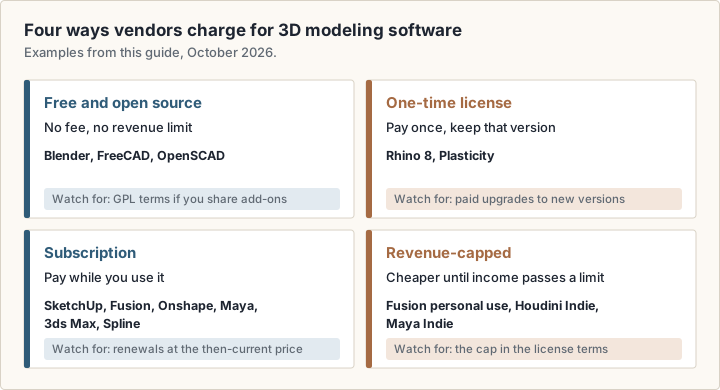
Figure 6 multiplies listed prices over three years for one person, at annual billing where offered, without tax or add-ons. Maya and 3ds Max are left out because Autodesk shows only a "starting at" figure. Cinema 4D and ZBrush are left out because no USD price was readable.
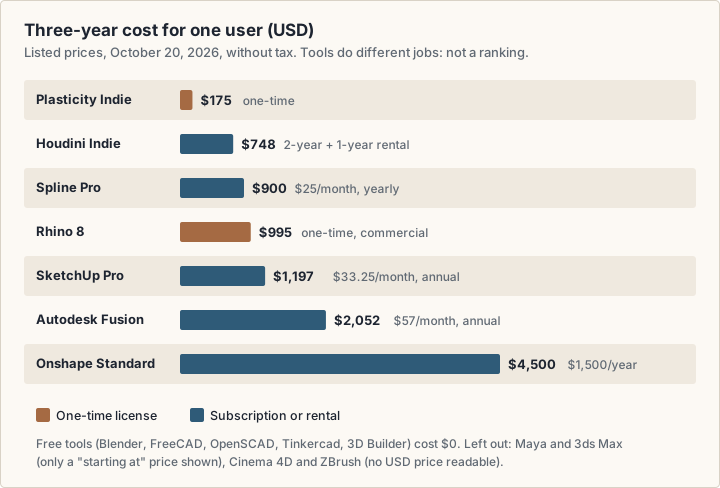
Houdini Indie is counted as a 2-year rental at $449 plus a 1-year rental at $299. Plasticity's $175 includes updates for the first 12 months only. A one-time license looks cheapest, but upgrades to a new major version cost extra. Rhino lists an upgrade at US$595. Price the next version too if you plan to stay current.
3D modeling software for Windows, Mac and Linux
Check the platform first: several tools rule out a whole operating system.
- Windows only: 3ds Max, Microsoft 3D Builder and SketchUp Studio.
- Windows, Mac and Linux: Blender, FreeCAD, OpenSCAD, Maya, Houdini and Plasticity.
- Windows and Mac: Rhino 8.
- Any device with a browser: Tinkercad, SketchUp Free and Go, Onshape and Spline.
- iPad: SketchUp Go and ZBrush for iPad.
Mac users should check the chip. Blender 5.0 and later require Apple Silicon and macOS 13 or later; Blender 4.5 LTS is the last release for Intel Macs (Blender requirements (opens in a new tab)). Houdini also requires an Apple Silicon Mac. Blender's minimum is 8 GB of RAM, and it recommends 32 GB, so check your hardware against each vendor's requirements page before you buy.
How to choose 3D modeling software
Work through these questions in order. Each one removes tools from the list.
- 1What is the output? A physical part needs CAD. A render, animation or game asset needs a mesh tool. A web scene needs a browser tool such as Spline.
- 2Will you earn money from it? If yes, rule out non-commercial tiers: Fusion personal use, Onshape Free and Houdini Apprentice. Check revenue caps on Indie licenses.
- 3Which operating system do you use? Use the platform list above.
- 4Which files must you exchange? Ask your printer, client or studio which formats they accept, such as STEP, STL, 3MF, FBX, DWG or IFC, and check the tool reads and writes them.
- 5Do you need your files private? Onshape Free makes documents public. Paid plans keep them private.
- 6How will you pay? Compare a one-time license with three years of subscription, as in Figure 6.
- 7Can you try it first? Use the free tier or trial on a real project before you pay.
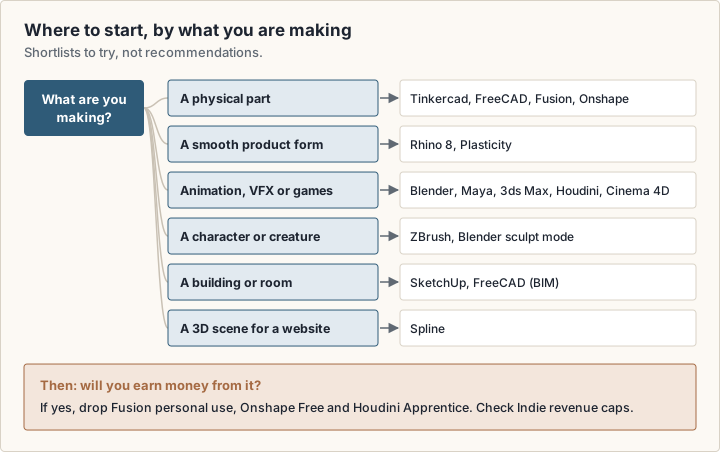
Try two tools from your shortlist on the same small project. If you work with 2D interface design as well, Figma covers that side; none of the 3D tools here replaces it.
Frequently asked questions
Which 3D modeling software is the easiest to use?
No vendor publishes a comparable ease-of-use measure. Tinkercad and Microsoft 3D Builder ask the least: you combine shapes and type sizes. Autodesk positions Tinkercad for beginners, children and occasional users.
Is FreeCAD actually free?
Yes. FreeCAD is open source, and its website states there are no licensing fees, no sign-up, no paywall and no restrictions. It runs on Windows, Mac and Linux.
Is Microsoft 3D Builder free?
Yes. The Microsoft Store lists 3D Builder at no cost for Windows. You install it while signed in to a Microsoft account.
What is the best free 3D modeling software?
It depends on the output, and this guide does not rank tools. For art, animation and games, Blender is free for any use, including commercial work. For measured parts, FreeCAD is free and parametric. For a first 3D print, Tinkercad runs in the browser.
Can I sell work I make with free 3D modeling software?
With Blender, yes: its license says your artwork is your sole property. FreeCAD and OpenSCAD are free software with no stated limit on use. Free tiers of commercial tools differ: Fusion personal use, Onshape Free and Houdini Apprentice are non-commercial. Read each license, and ask a qualified professional if a contract depends on it.
Sources
- Blender: license (opens in a new tab)
- Blender: features (opens in a new tab)
- Blender: requirements (opens in a new tab)
- Blender manual: modeling introduction (opens in a new tab)
- FreeCAD home page (opens in a new tab)
- FreeCAD downloads (opens in a new tab)
- OpenSCAD: about (opens in a new tab)
- Tinkercad home page (opens in a new tab)
- Tinkercad 3D design (opens in a new tab)
- Microsoft Store: 3D Builder (opens in a new tab)
- SketchUp plans and pricing (opens in a new tab)
- SketchUp Free (opens in a new tab)
- Autodesk Fusion for personal use (opens in a new tab)
- Autodesk Fusion overview and pricing (opens in a new tab)
- Autodesk: what is 3D CAD software (opens in a new tab)
- Autodesk Maya overview (opens in a new tab)
- Autodesk 3ds Max overview (opens in a new tab)
- Onshape pricing (opens in a new tab)
- Rhino: buy, North America (opens in a new tab)
- Rhino: download and evaluation (opens in a new tab)
- Rhino: features (opens in a new tab)
- Plasticity home page and pricing (opens in a new tab)
- SideFX: buy Houdini (opens in a new tab)
- SideFX: Houdini Indie (opens in a new tab)
- SideFX: system requirements (opens in a new tab)
- Maxon: buy (opens in a new tab)
- Maxon: Cinema 4D (opens in a new tab)
- Maxon: ZBrush (opens in a new tab)
- Spline pricing (opens in a new tab)
- Spline home page (opens in a new tab)
- 3MF Consortium (opens in a new tab)