Accounting software records what a business earns, spends, owns and owes, then turns those records into reports. Most pages that rank for the term are lists built on testing you cannot see. This guide compares nine options from their own pricing pages instead, and it does not rank them.
listing.sh did not test these products hands-on. Every price, limit and feature below comes from the vendor's pricing page or documentation, checked on October 20, 2026. Several vendors run launch discounts, so the guide quotes the list price and names each promo separately. Confirm every figure on the vendor page before you buy.
How to read the prices
Prices are US list prices in US dollars per month, billed monthly, as of October 2026, unless a line says otherwise. They exclude tax. Vendors can show other prices or currencies to visitors outside the US.
Not tax or financial advice
This guide compares software features and prices. It does not tell you how to file taxes, which accounting method to use or how to run payroll. Confirm your tax and compliance needs with a qualified accountant or tax professional.
What accounting software does
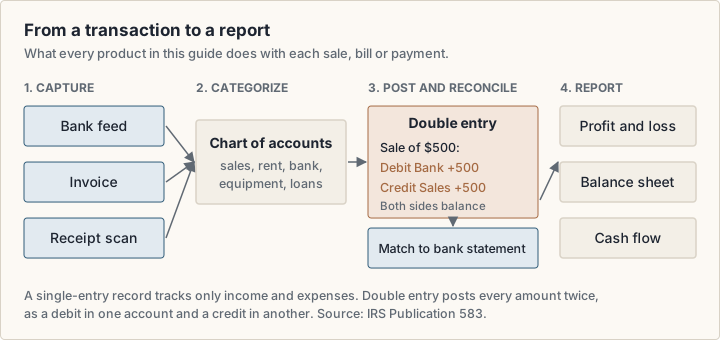
Every product here stores transactions, such as a sale, a bill or a bank payment, and files each under an account, such as sales or rent. Reports then read from those accounts.
IRS Publication 583 (opens in a new tab) describes two ways to keep books. A single-entry system follows the flow of income and expenses, and the IRS calls it the simplest to maintain. A double-entry system records every transaction as a debit in one account and a credit in another, so the books balance themselves. The IRS notes that double-entry has built-in checks for accuracy and control.
- Capture: bank feeds, receipt scans and invoices bring transactions in.
- Categorize: each transaction goes to an account in the chart of accounts.
- Reconcile: you match the books against the bank statement, line by line.
- Report: profit and loss, balance sheet and cash flow read from the ledger.
Bookkeeping software and accounting software overlap. Bookkeeping is the daily record: invoices, bills, receipts and bank matching. Accounting builds on that record with reports, budgets, adjustments and the year-end work an accountant does. Every product here covers bookkeeping. They differ in how far they go past it.
Plan tables also mention accounting methods. IRS Publication 538 (opens in a new tab) names the cash method, where you generally report income when you receive it, and the accrual method, where you report it when you earn it. Which method your business uses is a decision to make with your accountant. Then check that the software reports on that basis.
Cloud accounting software, desktop and open source
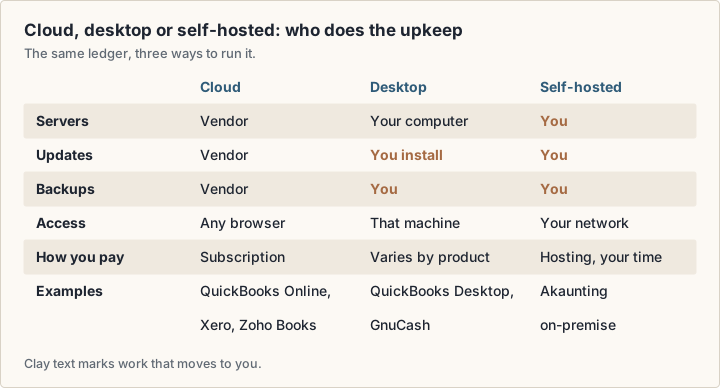
Cloud accounting software runs in a browser on the vendor's servers. You pay a subscription, and the vendor handles updates, backups and uptime. QuickBooks Online, Xero, FreshBooks, Wave, Zoho Books and the hosted plans of Odoo and Akaunting work this way.
Desktop software installs on your own computer or server. Intuit still sells QuickBooks Desktop, and its pricing page (opens in a new tab) lists QuickBooks Desktop Enterprise for up to 40 users. GnuCash (opens in a new tab) is free desktop software for Windows, macOS and Linux.
Open source accounting software publishes its code. GnuCash is licensed under the GNU GPL and is built entirely by volunteers. Akaunting describes itself as open source, sells cloud plans, and links to separate on-premise plans (opens in a new tab) if you want to host it yourself. When you host it, you also run the server, the backups and the updates.
If you shop for cloud-based accounting software for a small business, check three things before the price:
- Accountant access: can your accountant or bookkeeper log in without using a paid seat?
- Bank connection: does the plan import bank transactions, or do you type them in?
- Exit: can you export your full ledger, not just reports, if you leave?
The accounting software options in this guide
This list is a scope, not a ranking. It covers products that people search for by name, such as Xero, Wave, Sage and QuickBooks, plus Zoho Books, FreshBooks and three free or open source options. The groups below describe what each vendor builds for. They are not quality tiers.
- General small-business accounting: QuickBooks Online, Xero, Zoho Books and Sage.
- Invoicing first, for freelancers and service businesses: FreshBooks and Wave.
- Business suite, where accounting is one app among many: Odoo.
- Free and open source: GnuCash and Akaunting.
Accounting software prices compared
These are the published US list prices per month on October 20, 2026, from the lowest paid plan to the highest published plan.
- QuickBooks Online (opens in a new tab): Simple Start $38, Essentials $85, Plus $140, Advanced $340. A Free plan costs $0.
- Xero (opens in a new tab): Early $27, Growing $59, Established $97. Xero lists no per-user license fees.
- FreshBooks (opens in a new tab): Lite $23, Plus $43, Premium $70. Select is priced on request. Yearly billing takes an extra 10% off.
- Wave (opens in a new tab): Starter $0. Pro $19 a month, or $190 a year.
- Zoho Books (opens in a new tab): Free $0. Standard $20, Professional $50, Premium $70, Elite $150, Ultimate $275. Billed annually, these drop to $15, $40, $60, $120 and $240. Prices are per organization.
- Akaunting (opens in a new tab): Standard Cloud $12, Premium Cloud $36, Elite Cloud $84, Ultimate Cloud $218. The page says yearly billing gives four months free.
- Odoo (opens in a new tab): One App Free costs nothing. Paid plans are per user per month, and the page showed them in euros to listing.sh, so check the page for your price.
- Sage (opens in a new tab): the US pricing page returned an access error to listing.sh, so this guide quotes no Sage price.
- GnuCash (opens in a new tab): free.
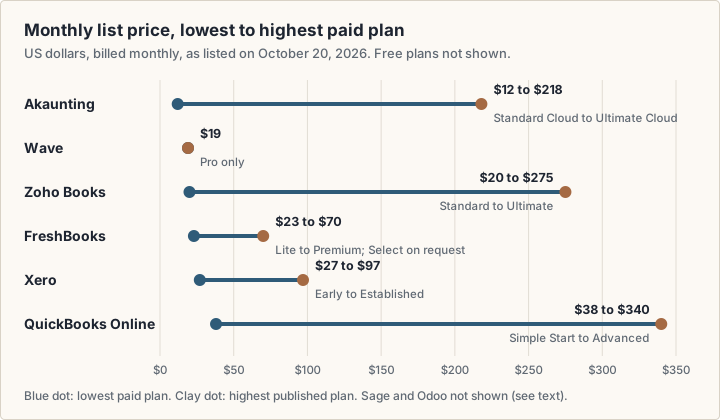
Top plans sell different things. QuickBooks Advanced adds up to 25 users and workflow automation. Zoho Books Ultimate adds business intelligence and analytics. Xero's highest plan on its US page is $97.
How much does QuickBooks actually cost?
At list price, QuickBooks Online costs $38 to $340 a month in the US. Simple Start includes 1 user, Essentials 3, Plus 5 and Advanced 25. Each paid plan includes access for 2 accountants, and Advanced for 3. The Free plan covers 1 user, 2 invoices a month and 1 bank connection, with no accountant access.
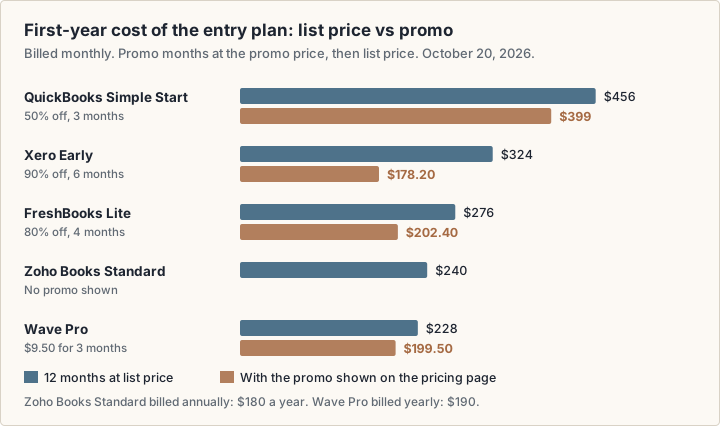
On October 20, 2026 the QuickBooks pricing page (opens in a new tab) offered 50% off for the first 3 months, so Simple Start showed $19 a month. From month four the list price applies. Payroll is an optional step at checkout, and the page did not show its price. Bill payments over the monthly allotment cost $0.50 per standard ACH transaction.
Promotions change the first-year bill
Four vendors showed a promo on October 20, 2026. Xero offered new US customers 90% off the base plan for 6 months, until November 2, 2026. FreshBooks offered 80% off for 4 months. Wave offered Pro at $9.50 a month for the first 3 months. QuickBooks offered 50% off for 3 months.
Check the promo terms
A promo price is not your year-two price. Xero's offer, for example, applies only to the base plan, not to add-ons, usage or payment fees. It ends on November 2, 2026.
Free accounting software: what the free plans include
Five options here cost nothing to start. Each one stops somewhere, and the stop is what matters.
- Wave Starter: unlimited estimates, invoices, bills and bookkeeping records. You enter bank transactions by hand; automatic bank import is a Pro feature. Online card payments cost 2.9% + $0.60 per transaction, or 3.4% + $0.60 for Amex.
- Zoho Books Free: 1 user plus 1 accountant, with bank reconciliation, recurring invoices, 1099 contractor tracking and over 50 reports. Zoho says the plan stays free as long as revenue for the financial year does not exceed $50K.
- QuickBooks Free: 1 user, 2 invoices a month and 1 bank connection. The mobile app and third-party integrations are not available on it.
- Odoo One App Free: one app, free for unlimited users. If the app depends on other apps, Odoo includes those too.
- GnuCash: free, double-entry, with customer and vendor tracking, invoicing and bill payment, per its features page (opens in a new tab). Help comes from volunteers on public mailing lists, not a support desk.
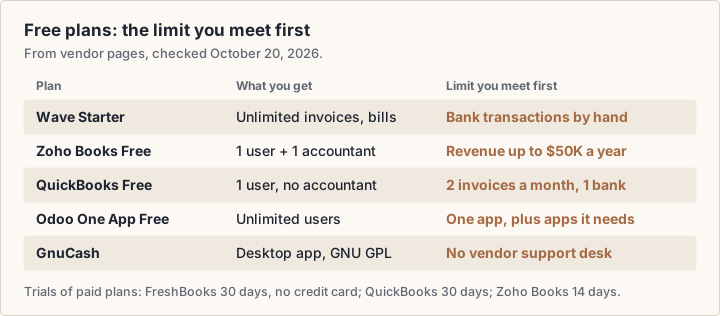
Free bookkeeping software suits a business with a few clients and simple expenses. Read the limit before you rely on it.
Trials are another way to test a paid plan. FreshBooks offers a 30-day free trial without a credit card. The QuickBooks page mentions a 30-day trial, and Zoho Books a 14-day trial.
QuickBooks Online and Xero compared
Both are general small-business accounting products, sold as monthly subscriptions. The main difference on the pricing pages is how they count people. QuickBooks sets a user count per plan. Xero lists no per-user license fees and limits its entry plan by volume instead.
| Feature | QuickBooks Online | Xero |
|---|---|---|
| Entry paid plan | Simple Start: $38 a month, 1 user | Early: $27 a month |
| Top published plan | Advanced: $340 a month, 25 users | Established: $97 a month |
| Free plan | Yes: 1 user, 2 invoices a month | None listed on the US page |
| Entry plan limit | 1 user, access for 2 accountants | 20 invoices and 5 bills |
| Promo on Oct 20, 2026 | 50% off for 3 months | 90% off for 6 months, new US customers, until Nov 2 |
| Payroll | Add at checkout; price not shown | Xero Payroll, powered by Gusto: $36 a month + $6 per person |
| Listed on the mid plan | Plus: inventory, budgets, project profitability | Growing: auto-reconcile, dashboards, 60-day cash flow forecast |
Xero lists sales tax, W-9 and 1099 management and a cash flow forecast on every plan. Its Established plan adds multiple currencies, project time and costs, and expense claims. On Early, auto-reconcile is an add-on at $5 a month. Payment fees for online invoices and some bill payments are extra on every Xero plan.
On Plus, QuickBooks tracks up to 40 classes and locations. Advanced removes that cap and adds user permission controls, workflow automation and Excel sync.
FreshBooks and Wave compared
FreshBooks and Wave both start from invoicing, which suits freelancers and service businesses. FreshBooks prices its plans by the number of clients you bill. Wave has a free plan and one paid plan.
| Feature | FreshBooks | Wave |
|---|---|---|
| Entry plan | Lite: $23 a month, invoices to 5 clients | Starter: $0 |
| Next plan | Plus: $43 a month, 50 clients; Premium: $70, unlimited | Pro: $19 a month or $190 a year |
| Promo on Oct 20, 2026 | 80% off for 4 months | Pro at $9.50 a month for 3 months |
| Extra people | Team members: $11 a month each | Admin, editor and viewer users on Pro |
| Card payments | 2.9% + $0.30; bank transfer (ACH) 1% | Starter: 2.9% + $0.60; Pro: 2.9% + $0 on the first 10 a month |
| Payroll | $40 a month + $6 per person | Paid add-on; see the Wave page |
| Accountant access | Listed from Plus | Payroll manager or Block Advisors tax pro roles, free |
In Wave accounting software, the Pro plan adds automatic bank import, automatic categorizing and unlimited receipt capture. Wave also sells bookkeeping help through Wave Advisors, an add-on with in-house bookkeepers. Its page showed two starting prices for it, so check the Wave pricing page (opens in a new tab) for yours.
FreshBooks Plus adds accounting reports, receipt scanning and accountant access. Premium adds project profitability and custom email templates. Select, priced on request, includes 2 team member accounts and lower payment fees. FreshBooks Payroll and Advanced Payments ($20 a month) are add-ons.
Zoho Books, Sage and Odoo
Zoho Books (opens in a new tab) prices each plan per organization and includes a set number of users: 3 on Standard, 5 on Professional, 10 on Premium and Elite, 15 on Ultimate. More users cost $3 each a month, or $2.50 billed annually. Standard adds bank feeds, sales tax tracking and 1099 e-filing. Professional adds multi-currency, inventory and project billing. Premium adds budgets, fixed assets and cash flow forecasting.
Sage accounting software is sold in many countries, and searches for it are common. Its US pricing page (opens in a new tab) returned an access error to listing.sh on October 20, 2026. This guide therefore quotes no Sage price or plan limit. Check the page directly before you compare it.
Odoo (opens in a new tab) treats accounting as one app in a business suite that also covers sales, inventory and more. One App Free is free for unlimited users. Paid plans charge per user, but customers and suppliers who only use the portal are not paying users. The page showed euro prices to listing.sh, so confirm your currency on the page.
Open source accounting software: GnuCash and Akaunting
GnuCash (opens in a new tab) is personal and small-business accounting software under the GNU GPL. It runs on Windows, macOS and Linux, and its download page offered version 5.17 on October 20, 2026. It uses double-entry accounting and imports bank files in QIF and OFX formats. There is no paid plan and no vendor support desk.
Akaunting (opens in a new tab) sells hosted plans from $12 a month. Standard Cloud covers 1 company, 1 user plus 1 accountant and 1,000 invoices. Premium Cloud at $36 covers 10 users and 10,000 invoices. Self-hosting has its own plans page.
Self-hosting moves the upkeep to you: the server, security patches, backups and restores. The same trade-off shows up with project management software. For a ledger you may need to show a tax authority, test a restore before you trust the backups.
How to choose small business accounting software
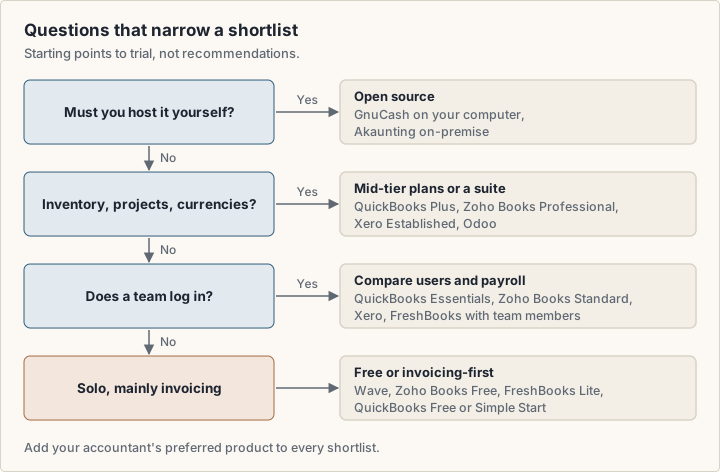
Start from the shape of your business, not from a feature list. These questions narrow a shortlist; they are not recommendations.
Freelancers and solo consultants
You mainly need invoices, expenses and a clean record for your accountant. Wave Starter and Zoho Books Free cost nothing. FreshBooks Lite caps billable clients at 5, and QuickBooks Free caps invoices at 2 a month. Check whether a cap fits your number of clients.
Small businesses with staff
Count the people who need to log in, then add your accountant. QuickBooks Essentials includes 3 users and Zoho Books Standard 3. Xero lists no per-user fees. FreshBooks charges $11 a month per team member. Payroll is an add-on almost everywhere, so price it in.
Inventory, projects or more than one currency
These features sit on mid or upper plans. Inventory appears on QuickBooks Plus and Zoho Books Professional. Multi-currency appears on Xero Established and Zoho Books Professional. If you also need sales and stock in one system, Odoo is built as a suite.
Startups that sell online
Your payment processor feeds the books. If you sell with Stripe, taking payments with Stripe covers the payment side, and the Stripe tool page lists its basics. Check that your accounting software imports from your processor. If it does not, a connector such as Zapier can bridge some apps; check that both sides are supported.
Costs beyond the subscription
The plan price is rarely the whole bill. These charges sit on top, from the same pricing pages.
- Payroll: Xero Payroll, powered by Gusto, is $36 a month plus $6 per employee or contractor. FreshBooks Payroll is $40 a month plus $6 per user.
- People: FreshBooks team members cost $11 a month each. Extra Zoho Books users cost $3 a month each.
- Payments: card fees apply on every invoice paid online, such as 2.9% + $0.30 with FreshBooks Payments.
- Add-ons: Xero auto-reconcile on Early is $5 a month. FreshBooks Advanced Payments is $20 a month. Zoho Books sells extra document scans.
- Help: bookkeeping services, such as Wave Advisors, are priced separately.
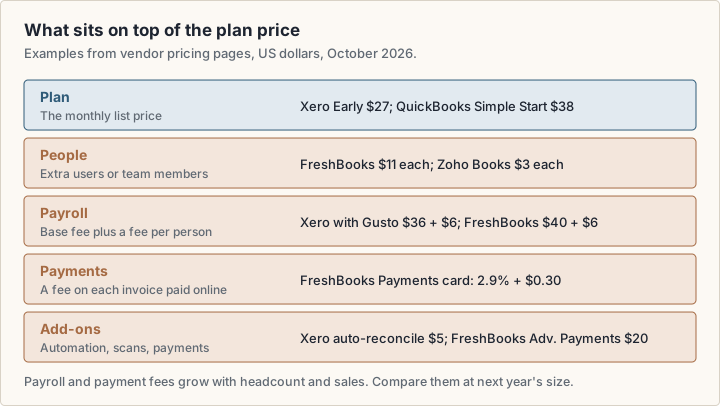
Payroll and payment fees grow with your business, so compare them at next year's size. If you run payroll, confirm your filing obligations with a qualified professional.
Types of accounting, and what software covers
There is no single official list of seven types of accounting. The US Bureau of Labor Statistics (opens in a new tab) describes the main roles instead: public accountants, management accountants, government accountants, internal auditors, external auditors and IT auditors. It treats forensic accounting as a specialty within public accounting.
Software covers the daily records and standard reports. Budgets and forecasts on mid-tier plans touch management accounting. Tax returns, audits and forensic work stay with qualified professionals.
Switching software and working with your accountant
Talk to your accountant before you switch. Your accountant may already work in a particular product, and accountant seats differ by plan. QuickBooks lists accountant access on every paid plan, Zoho Books Free includes 1 accountant, and FreshBooks lists it from Plus.
- Pick a switch date, such as the start of a month or quarter.
- Export your full ledger and reports from the old system, and keep them.
- Check that opening balances in the new system match the old one.
- Ask whether the vendor helps: FreshBooks Select lists Easy Switch data import, and Wave Advisors lists onboarding from other software.
Ask a professional
Year-end, tax filings and payroll rules depend on where you operate. Confirm them with a qualified accountant or tax professional, not with a software vendor's marketing page.
Frequently asked questions
Which accounting software is most used?
No neutral public count exists, and vendors report their numbers in different ways. Xero's US pricing page says it is trusted by 5 million customers. Intuit's fiscal 2026 annual report (opens in a new tab) gives growth rates for QuickBooks Online but no stand-alone customer total. Popularity also varies by country, so ask accountants near you what they support.
Is there a Google accounting software?
No. The Google Workspace products page (opens in a new tab) lists apps such as Gmail, Drive, Docs and Sheets, but no accounting app. Some small businesses keep a simple single-entry record in a spreadsheet, which the IRS describes as a practical start. A dedicated product adds bank import, double-entry and reports.
Is Wave accounting software really free?
The Starter plan costs $0 and allows unlimited invoices, bills and bookkeeping records. Card payments, the Pro plan and add-ons such as payroll cost extra. Automatic bank import needs Pro.
Can accounting software do my taxes?
It keeps the records and reports that a tax return uses, and several plans list 1099 or sales tax features. Whether you can file yourself depends on your situation. Ask a qualified tax professional.
What is the best accounting software for a small business?
No single product fits every business, and listing.sh did not test these products, so this guide does not rank them. Use the section on choosing by business type to build a shortlist, then use free plans and trials to test the work you do every week.
Sources
- QuickBooks Online pricing (Intuit) (opens in a new tab)
- Xero US pricing plans (opens in a new tab)
- FreshBooks pricing (opens in a new tab)
- Wave pricing (opens in a new tab)
- Zoho Books US pricing (opens in a new tab)
- Sage US accounting pricing (opens in a new tab)
- Odoo pricing (opens in a new tab)
- GnuCash (opens in a new tab)
- GnuCash features (opens in a new tab)
- Akaunting plans (opens in a new tab)
- IRS Publication 583: Starting a Business and Keeping Records (opens in a new tab)
- IRS Publication 538: Accounting Periods and Methods (opens in a new tab)
- US Bureau of Labor Statistics: Accountants and Auditors (opens in a new tab)
- Intuit Form 10-K, fiscal 2026 (SEC) (opens in a new tab)
- Google Workspace products (opens in a new tab)