Website builder AI tools now draft a whole site from one sentence or a short questionnaire. The draft is the easy part. What you pay, what the free tier allows and whether you can leave later differ a lot between builders, and those details decide what the site costs you over the next few years.
This guide compares nine AI website builders using their own pricing and help pages, checked on 20 October 2026: Wix, Squarespace, Hostinger, Durable, Framer, Webflow, GoDaddy Airo, 10Web and, as a contrast, the prompt-to-app tool v0. listing.sh did not build test sites with them, so there are no scores or rankings here. Each entry lists what the AI generates, how you edit afterwards, the free tier, the entry price, domains, ecommerce, export, and what you should check before you pay.
Website builder AI: what it does and what it does not
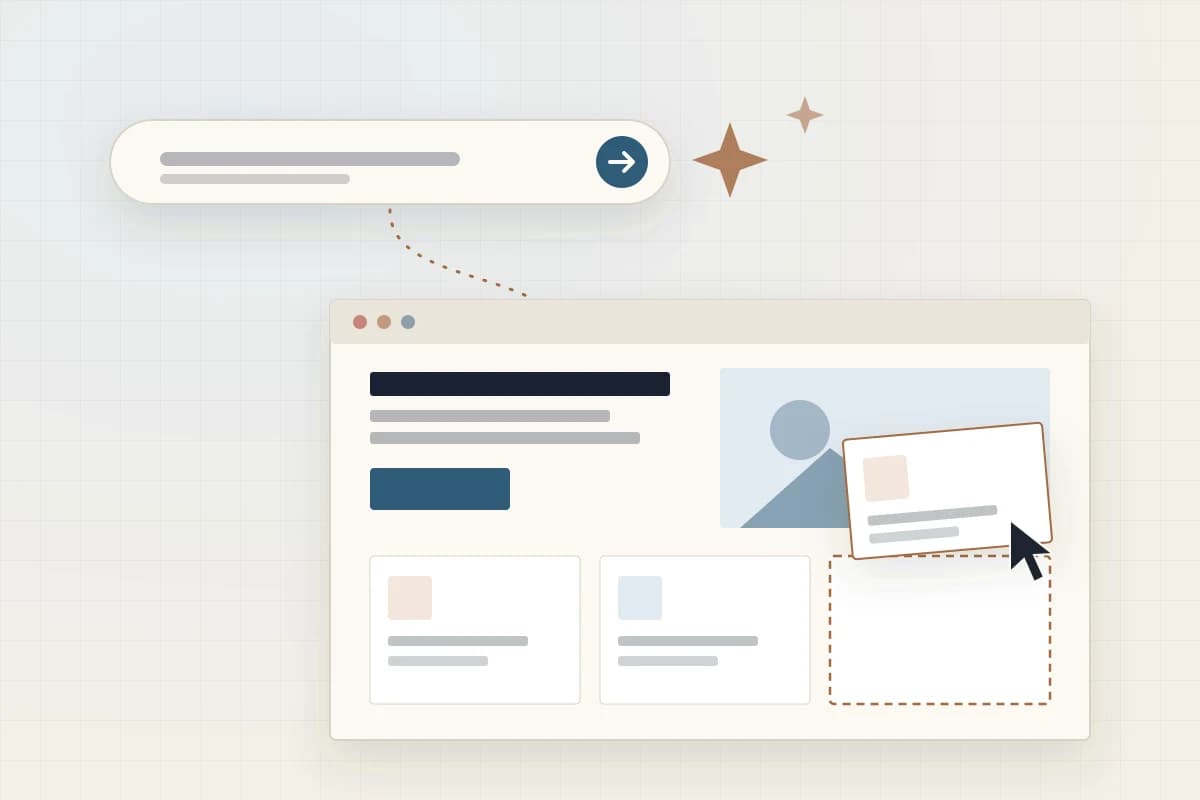
An AI website builder, also called an AI-powered or artificial intelligence website builder, turns a description of your business into a first draft of a site. Webflow's own definition is a fair summary: these builders "generate a professional website from start to finish — including a functional layout, images, and copy — based on a prompt that you give it" (Webflow (opens in a new tab)).
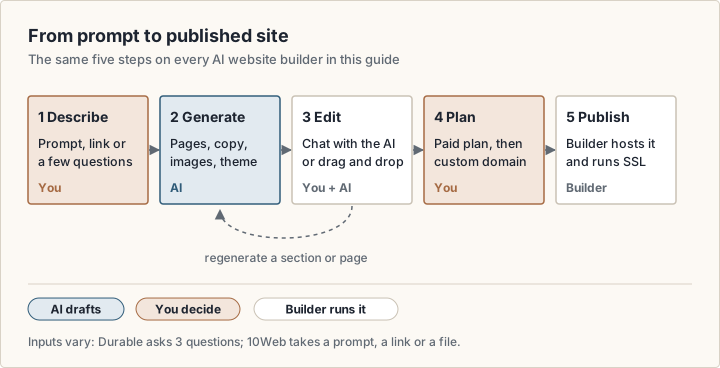
The input differs from tool to tool. Wix and Webflow take a free-text prompt. Durable asks three questions: your industry, business name and goals (Durable (opens in a new tab)). 10Web accepts "a prompt, a link or a file", so it can start from an old site (10Web (opens in a new tab)). After the draft, every builder in this guide gives you an editor: a chat with the AI, a drag-and-drop canvas, or both.
What the AI does not do is check facts. It writes plausible copy, not verified copy. Google's guidance on generative AI content warns that models "don't retrieve facts, but predict a likely sequence of words", and asks site owners to fact-check AI output before publishing, including page titles, meta descriptions, structured data and image alt text (Google Search Central (opens in a new tab)). The AI also does not know your prices, opening hours, service area or returns policy unless you tell it.
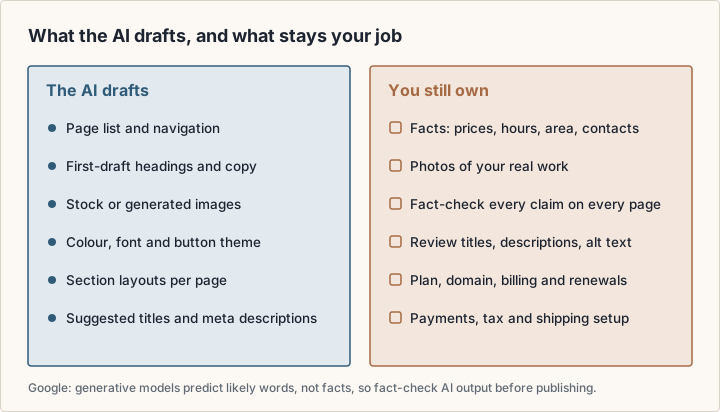
Squarespace says the same thing plainly in its FAQ: AI "helps you start and can support you as you build, but it does not replace the editor" (Squarespace (opens in a new tab)).
AI site builder or AI app builder?
Search results for this topic mix two kinds of tool. An AI site builder produces pages on a hosted platform: you edit blocks, the vendor runs the hosting, and the site stays inside that product. A prompt-to-app builder produces application code, often with a database and logins, that you or a developer can take elsewhere.
The line is blurring. Hostinger's AI Builder now has two modes: Manual, a drag-and-drop builder, and Agentic, which Hostinger describes as vibe coding that builds "both websites and web apps through prompting AI" (Hostinger (opens in a new tab)). GoDaddy's Airo AI Builder generates "pages, logic, database, and design" (GoDaddy Airo AI Builder (opens in a new tab)). v0 from Vercel sits fully on the app side: its free plan deploys apps to Vercel and syncs with GitHub (v0 (opens in a new tab)).
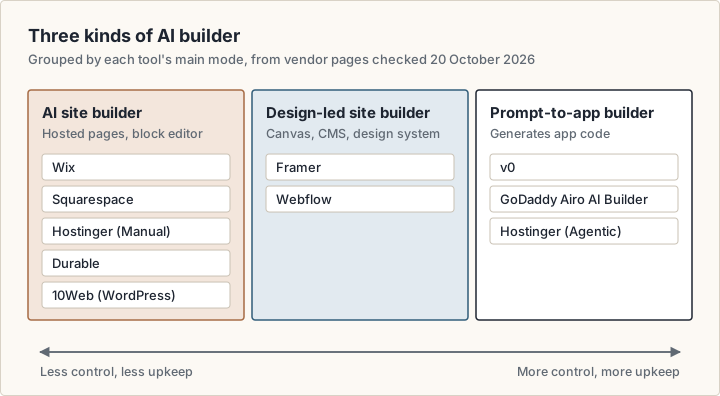
The kind of tool matters more than the brand. A site builder keeps upkeep low, because the vendor patches, hosts and backs up the site. A code-generating builder gives you more freedom and more responsibility, because someone has to maintain that code. Our guide to building full-stack apps without code covers the app side in more depth.
How to build a website with AI, step by step
Yes, you can build a working website with AI, and the steps are much the same on every builder. Generation is fast; Durable says it produces a site "in around 30 seconds" (Durable (opens in a new tab)). The review takes longer.
- 1Write down the facts first: business name, services, prices, location, contact details and the one action you want visitors to take. The AI fills gaps with guesses, so give it fewer gaps.
- 2Pick the kind of builder: a site builder for a brochure, booking or store site, or a prompt-to-app builder for logins, dashboards or custom logic.
- 3Generate a draft on the free plan or trial. Give the same prompt to two or three builders and compare the drafts.
- 4Fix the structure before you polish. Add, remove and reorder pages and sections first, then edit text and images. Webflow documents the same order: describe, add structure, customise styles, then extend (Webflow (opens in a new tab)).
- 5Replace generic content. Swap stock or generated images for photos of your own work, and rewrite any sentence you cannot stand behind.
- 6Fact-check every page and review the metadata: page titles, meta descriptions and image alt text (Google Search Central (opens in a new tab)).
- 7Choose a plan and connect a domain. On most builders in this guide, a custom domain needs a paid plan.
- 8If you sell, set up payments, tax and shipping, then place a real test order.
- 9Publish, then check the site on a phone and on a slow connection before you share the address.
AI website builder options compared
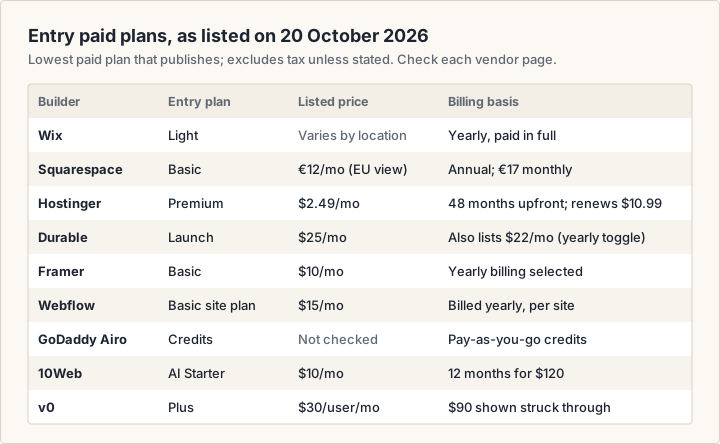
Each entry comes from the vendor's own pages, checked on 20 October 2026. Prices are as of October 2026, exclude tax unless stated, and change often, so check the linked page before you buy. Squarespace showed euro prices to our European connection, and Wix sets prices by location after the page loads, so Wix appears here without prices. We could not read USD list prices for Wix, Squarespace or GoDaddy Airo, so none are given. Prices vary by location; check the vendor page: Wix plans (opens in a new tab), Squarespace pricing (opens in a new tab) and GoDaddy Airo (opens in a new tab).
How to read each entry
Free option is what you can use without paying. Paid plans start from the lowest plan that publishes a site, at the billing term the vendor advertises. Export is what you can take with you if you leave. Check is what the vendor page does not settle for you.
Wix AI website builder
Wix builds a site through a conversation: you describe what you want, and the AI "generates a complete site with industry-specific logic, tailored copy and high-quality visuals already wired in" (Wix (opens in a new tab)). Afterwards you can keep prompting Aria, Wix's built-in AI agent, or switch to drag-and-drop editing to adjust layouts, fonts, colours and styling.
- Free option: you can start free with no credit card. Free sites use an address like username.wixsite.com/sitename, and a Premium plan lets you connect your own domain and remove Wix branding (Wix plans (opens in a new tab)).
- Paid plans: Light, Core, Business and Business Elite. Wix says prices and currency vary by location, and that displayed prices are for yearly subscriptions paid in full. Plans carry a 14-day money-back guarantee.
- Custom domain: on Premium plans. Most yearly plans include a voucher for a new domain, free for one year.
- Ecommerce: Light does not list it. Accept payments and Basic eCommerce start at Core, and Business and Business Elite add Standard and Advanced eCommerce.
- Export: no move to another host. Wix says its "SaaS architecture does not support external hosting", although "the content you build on Wix belongs to you" (Wix Help Center (opens in a new tab)).
- Check: the price in your currency at checkout, and whether you need Core to take payments.
Squarespace AI website builder (Blueprint AI)
Squarespace asks you to share "what the website is for, who it serves, what visitors should be able to do, and how you want it to feel", then creates "a multi-page starting point with relevant content, imagery, and styling already in place" (Squarespace (opens in a new tab)). The page calls the tool its AI Website Builder; the name Blueprint AI appears in an award badge that cites TIME's Best Inventions of 2025. After generation you work in the normal drag-and-drop editor.
- Free option: a 14-day trial with no credit card. You can use the AI builder during the trial, but "you need a paid Squarespace website plan to publish the site".
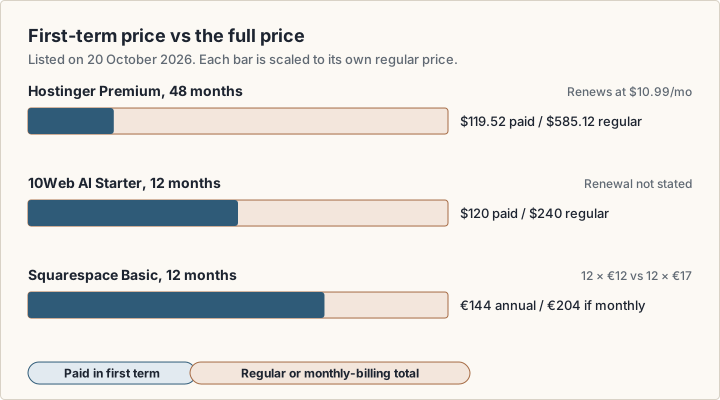
- Paid plans, as shown to a European visitor: Basic €12 a month billed annually or €17 billed monthly, Core €18 or €24, Plus €32 or €42, and Advanced €69 or €79 (Squarespace pricing (opens in a new tab)). Prices in your region may differ.
- AI credits: Basic includes 10 one-time credits. Core, Plus and Advanced include 20, 40 and 120 credits a month.
- Custom domain: annual plans include one free domain registration for the first year, and you can connect domains on any plan.
- Ecommerce: available from Basic with a 2% online store transaction fee, which drops to 0% on Core and above.
- Export: partial. Squarespace exports a WordPress-format .xml file with layout pages, one blog, and text and image blocks. Product blocks, style settings and custom CSS do not export, and you cannot export from a trial site (Squarespace Help (opens in a new tab)).
- Check: the transaction fee on your plan, and whether the AI credits cover the edits you expect to make.
Hostinger AI Website Builder
Hostinger's AI Builder has two modes. In Manual mode you describe the site and get "a ready-made site generated instantly", then refine it by drag and drop. In Agentic mode you build and edit through chat, and you can still edit text and images directly "without spending a single prompt credit" (Hostinger (opens in a new tab)). Built-in tools generate logos, blog posts and product descriptions, and help with SEO.
- Free option: no free plan. Hostinger offers a 14-day free trial, and you need a paid plan to publish (Hostinger (opens in a new tab)). Paid plans carry a 30-day money-back guarantee.
- Paid plans: Premium is $2.49 a month, paid upfront as 48 months for $119.52, and renews at $10.99 a month. Unlimited is $3.49 a month on the same term and renews at $16.99. Cloud Startup is $7.99 and renews at $25.99.
- AI credits: 250, 500 or 1,000 by plan, as a one-time gift.
- Custom domain: free for one year on plans of 12 months or longer. Premium allows up to 3 websites.
- Ecommerce: included on Unlimited and Cloud Startup. On Premium it is listed as "available at the checkout".
- Export: the plan table lists "Code editor and export" under Agentic mode, and the FAQ says source code access is available. The page does not say the same for Manual-mode sites.
- Check: the renewal price, which is what you pay after the first term, and which mode your site uses if export matters to you.
Durable website builder
Durable is aimed at service businesses. You answer three questions and it generates "a complete website with relevant content, images, and design tailored to your needs" (Durable (opens in a new tab)). You can then change layout, images, headings and fonts without code. Paid plans add AI agents that work in the background, for example publishing blog posts and collecting reviews.
- Free option: a $0 plan with a website preview, 300 AI credits in total and a CRM for up to 10 customers (Durable pricing (opens in a new tab)). In the plan comparison table, the Free plan's custom-domain cell reads "Private preview".
- Paid plans: Launch shows $25 a month on its plan card and $22 a month in the comparison table. Grow shows $49 and $41. The page has a yearly toggle labelled "Save 15%", which fits the lower figures, but it does not label them.
- AI credits: 1,000 a month on Launch and 5,000 a month on Grow.
- Custom domain: free with paid plans. Launch includes a domain worth up to $20, and Grow includes a $40 domain credit. If you cancel, Durable says it will transfer your custom domain on request, which "takes a couple of weeks".
- Ecommerce: limited. Durable says it "is not designed specifically to support e-commerce businesses".
- Export: the pricing page offers none, and Durable says it does not offer "extensive options for HTML customization".
- Check: which price applies to your billing term, and whether the booking and CRM features replace tools you already pay for.
Framer AI
Framer's AI agent works on the same canvas that designers use. You "describe the website, page, or update you need", and it "creates editable pages, sections, copy, and visuals directly in your project" (Framer (opens in a new tab)). Framer stresses that the output is editable layers, not a locked template, so you can refine layout, typography, breakpoints and effects by hand. The Framer tool page has an overview.
- Free option: $0 with 500 AI credits to try, a free Framer domain and 1 GB of bandwidth. Framer calls the Free plan "ideal for non-commercial use" (Framer pricing (opens in a new tab)).
- Paid plans: Basic is $10 a month and Pro $30 a month, with yearly billing selected on the page. Basic includes 1,000 AI credits a month, 30 pages and 50 GB of bandwidth. Pro includes 3,000 credits, 150 pages and 100 GB.
- Custom domain: paid plans only. A complimentary domain is included with yearly billing.
- Ecommerce: the pricing page lists no store or checkout feature.
- Export: none. Framer's help centre says it "does not offer HTML export for self-hosting" (Framer Help (opens in a new tab)).
- Check: the page, CMS and bandwidth limits on Basic, and the cost of extra editors at $20 a month each.
Webflow AI site builder
Webflow's AI site builder turns a prompt into "a functional site and a foundational design system", built on Webflow's Flowkit CSS framework (Webflow (opens in a new tab)). You then add, remove or reorder sections and pages and change styles across the site, and you can keep using Webflow AI to generate new pages and CMS items. The Webflow tool page has more context.
- Free option: the Starter site plan publishes to a webflow.io address with 2 static pages, a limited CMS, 1 GB of bandwidth and 50 form submissions, and includes Webflow AI. The free Starter Workspace includes 200 AI credits (Webflow pricing (opens in a new tab)).
- Paid plans: site plans are priced per site, in US dollars. Basic is $15 a month billed yearly, with a custom domain, 300 static pages and 10 GB of bandwidth. Premium is $25 a month billed yearly and adds the CMS. The page says yearly billing saves up to 40%.
- Custom domain: needs a paid site plan.
- Ecommerce: separate plans, from $29 a month billed yearly for 500 items with a 2% transaction fee, then $74 and $212 a month.
- Export: yes, on paid Workspace plans, such as Core at $19 a month billed yearly. You get HTML and CSS. CMS content exports collection by collection, and forms stop working on an exported site.
- Check: whether you need both a site plan and a Workspace plan, and the monthly price if you do not want to commit for a year.
GoDaddy Airo AI Builder
Airo AI Builder is GoDaddy's conversational builder. You describe "a website, web app, or online store", and it generates a working product with pages, logic, a database and design (GoDaddy Airo AI Builder (opens in a new tab)). You keep iterating in chat, then publish to a GoDaddy subdomain or your own domain.
- Free option: 50 free credits at sign-up, with no credit card. GoDaddy says that is "enough to build and publish a complete project".
- Paid: more credits on a pay-as-you-go basis, with "no subscription required". GoDaddy's main website builder and Airo pages refused our requests on 20 October 2026, so this guide lists no GoDaddy plan prices. Check them on godaddy.com.
- Custom domain: connect a domain you already own, or buy one through GoDaddy.
- Ecommerce: yes. The FAQ says you can build a store, set up product listings and accept payments.
- Export: yes. GoDaddy says Airo AI Builder "gives you full access to the source code of everything you build".
- Check: how many credits a typical edit uses, and what publishing costs once the free credits run out.
10Web AI website builder
10Web builds WordPress sites. You start "with a prompt, a link or a file", it plans the pages, and stores are generated on WooCommerce (10Web (opens in a new tab)). You then edit with AI or by hand in 10Web's editor, which its FAQ says is based on Elementor (10Web pricing (opens in a new tab)).
- Free option: a 3-day free trial with 5 AI credits. To launch the site and keep it, you upgrade to a paid plan.
- Paid plans: AI Starter is $10 a month, billed as 12 months for $120 against a regular price of $240, for 1 website, 100 AI credits a month and 10K monthly visitors. AI Premium is $15 a month for 2 websites, and AI Ultimate $22.50 a month for 4.
- Custom domain: the first one is free for a year, up to $30. The 30-day money-back guarantee applies only until you claim it.
- Ecommerce: every plan lists an ecommerce dashboard, product and order management, and 10Web Payments.
- Export: the platform runs full WordPress with SFTP and SSH access on all plans, so the site lives in a standard CMS rather than a closed format.
- Check: the renewal price, which the page does not state, and how Elementor-based pages behave on another WordPress host.
v0, a prompt-to-app contrast
v0 from Vercel is not a website builder in the hosted-template sense. It generates application code from chat, which you can deploy to Vercel, edit visually in Design Mode, or sync to GitHub (v0 (opens in a new tab)). It suits interactive front ends and app prototypes more than a brochure site that a non-technical owner will maintain. See the v0 tool page for more.
- Free option: $0 with a limit of 7 messages a day. New users also get $5 in one-time credits.
- Paid plans: Plus is $30 per user per month, shown against a struck-through $90, with $30 of included monthly credits and $2 of free daily credits on login. Business is $100 per user per month.
- Custom domain and ecommerce: the pricing page does not cover them. They depend on the code v0 generates and where you host it.
- Export: the code syncs to GitHub, so a copy lives in your own repository.
- Check: who will maintain the code, and how quickly the message limits run out on real edits.
Free AI website builder options: what free really means
Every builder here lets you try AI generation without paying, but free means three things: a free plan you can publish on, a time-limited trial, or a credit allowance. Wherever a vendor page addresses it, a custom domain needs a paid plan.
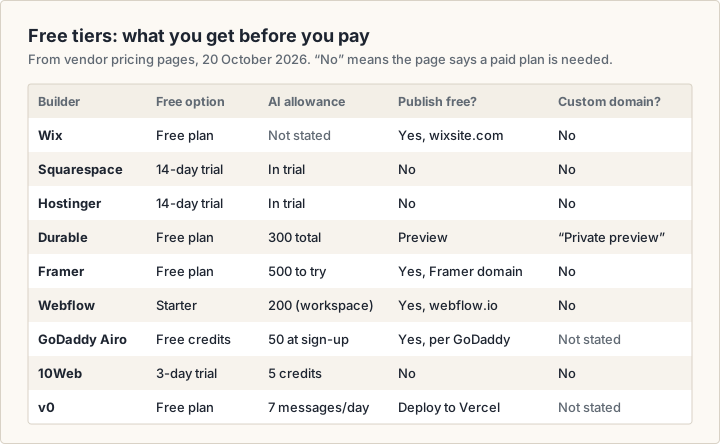
For a free site that stays online, the free plans from Wix, Framer and Webflow publish to a vendor subdomain, with limits on pages, bandwidth or branding. GoDaddy says its 50 free credits are enough to build and publish a project. Squarespace, Hostinger and 10Web offer trials: good for comparing drafts, but you pay to go live. To compare them, give each the same prompt and judge the drafts by the work still left to do.
Ownership, export and lock-in
Lock-in is a cost you pay later: if a builder cannot export, moving means rebuilding the site by hand. Protect the domain name at least. Most builders here let you connect a domain you already own, so register it with a registrar you control.
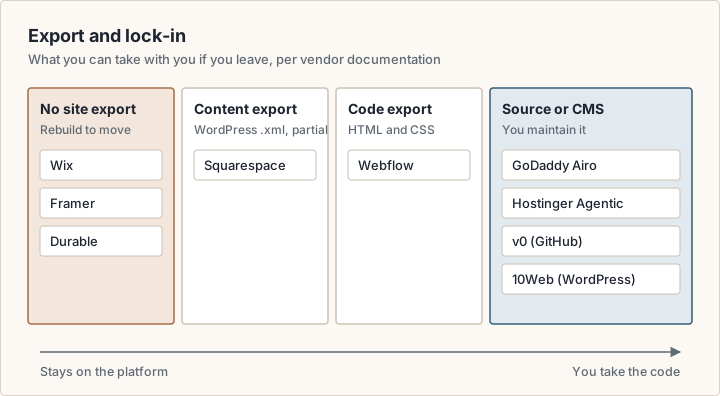
Export is not automatically better. Exported code needs hosting, updates and someone who can read it. For a five-page local business site, a closed builder with low upkeep can be a sensible choice, as long as you accept that leaving means a rebuild.
SEO for AI-built websites
Google does not ban AI-written pages. Its guidance says generative AI "can be particularly useful when researching a topic, and to add structure to original content", but that using it "to generate many pages without adding value for users may violate Google's spam policy on scaled content abuse" (Google Search Central (opens in a new tab)).
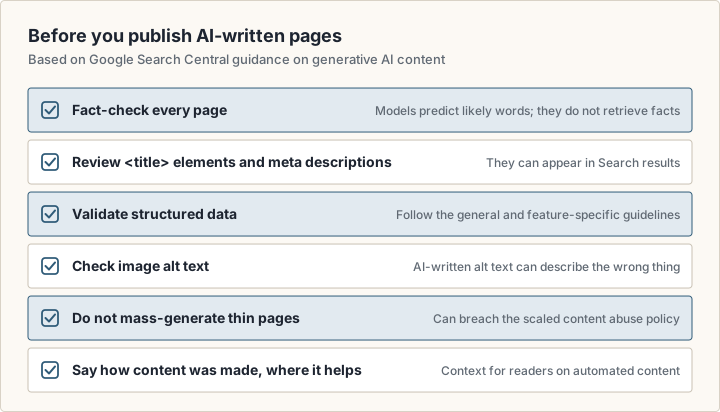
Builders add their own SEO tooling. Hostinger offers AI tools to find keywords, generate meta titles and descriptions and write image alt text, and it generates a sitemap automatically (Hostinger (opens in a new tab)). Durable's plan table lists structured data (JSON-LD), a sitemap and robots.txt among its SEO features (Durable pricing (opens in a new tab)). These tools fill in fields; they do not make the content accurate.
How to compare AI website builders for your use case
There is no single best AI website builder. The right one depends on what the site must do, who will maintain it and whether you may want to move it. Start from the job, not the brand.
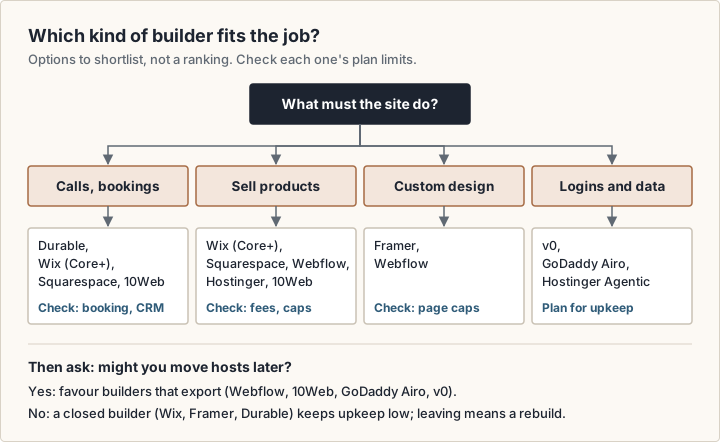
A local service business
You need clear services, contact options and probably bookings. Durable's Launch plan lists unlimited bookings synced to your calendar and a built-in CRM (Durable pricing (opens in a new tab)). Wix lists scheduling and services from its Core plan (Wix plans (opens in a new tab)).
An online store
Compare transaction fees and item caps before design. Squarespace charges a 2% online store fee on Basic and 0% from Core (Squarespace pricing (opens in a new tab)). Webflow's Standard ecommerce plan allows 500 items with a 2% fee (Webflow pricing (opens in a new tab)). Wix starts payments at Core, Hostinger includes ecommerce from its Unlimited plan, and 10Web builds stores on WooCommerce.
A designed marketing site
Framer and Webflow both generate an editable starting point inside a full design tool. Our Framer vs Webflow comparison covers how the two differ.
An app with logins or custom logic
For accounts, dashboards or a database, look at v0, GoDaddy Airo AI Builder or Hostinger's Agentic mode, and budget for someone to maintain the code.
Questions to ask every builder
- What does the plan renew at after the first term?
- Is the price per site, per user or per account?
- How many AI credits do you get, and do they reset monthly or run out?
- Can you publish on the free tier, and on whose domain?
- Which plan unlocks a custom domain, payments and removal of the vendor's branding?
- What can you export if you leave?
- What transaction fee applies on top of your payment processor's fee?
AI website builder vs a web designer: what you pay for
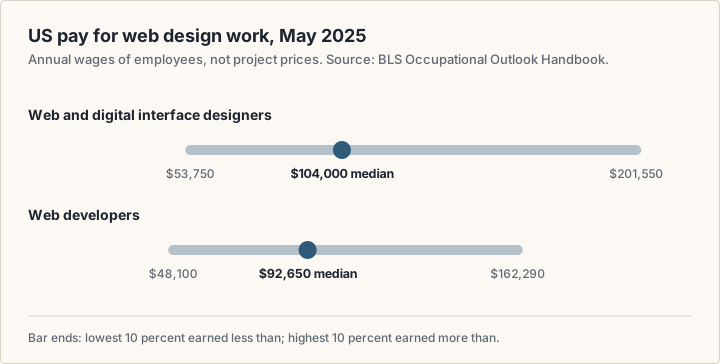
No official source publishes what a website designer charges for a project; quotes vary with scope, region and experience. The closest primary data is pay. The US Bureau of Labor Statistics (BLS) reports a median annual wage of $104,000 for web and digital interface designers and $92,650 for web developers in May 2025 (BLS (opens in a new tab)). Those are employee wages, not project prices. A freelancer's rate also has to cover tools, unbilled time and taxes.
A builder sells you software and hosting; a designer sells you time and judgement.
| Feature | AI website builder | Web designer |
|---|---|---|
| You pay for | A subscription, AI credits and add-ons | Design and build time, often plus a builder subscription |
| Structure and copy | AI draft that you review and rewrite | Planned with you; copywriting may cost extra |
| Design | Generated from the builder's design system | Made for your brand |
| Changes after launch | You make them, with AI help | Per the contract or a retainer |
| Ongoing cost | Monthly or yearly plan, then renewals | Hosting or builder plan, plus any support agreement |
| Ownership | Depends on the builder's export options | Depends on the contract and the platform used |
The two are not exclusive. Framer gives Pro Experts free editor access on client projects (Framer pricing (opens in a new tab)), and Webflow sells Workspace plans for freelancers and agencies (Webflow pricing (opens in a new tab)). So a designer's quote may include a builder subscription too.
Frequently asked questions
Is it possible to build a website with AI?
Yes. Every builder in this guide generates a multi-page draft from a prompt or a few questions, and lets you edit and publish it. The AI handles structure, first-draft copy, images and styling. You still supply the facts, check every claim, set up payments and choose a paid plan for a custom domain.
What is the best free AI website builder?
It depends on what free has to cover. To publish for free on a vendor subdomain, the free plans from Wix, Framer and Webflow do that, each with limits. To compare drafts before paying, the trials from Squarespace, Hostinger and 10Web work. listing.sh has not tested these builders, so check each free tier against the matrix above.
Which is the best free AI app builder?
Compare the free limits rather than a ranking. v0's free plan allows 7 messages a day plus $5 in one-time credits for new users (v0 (opens in a new tab)). GoDaddy's Airo AI Builder gives 50 free credits at sign-up (GoDaddy Airo AI Builder (opens in a new tab)). Hostinger includes its Agentic mode, which builds web apps, in every AI Builder plan; check whether its 14-day trial covers it. The right one depends on whether you want to keep the code (v0 syncs to GitHub) or stay on a hosted platform.
How much does a website designer cost?
No official price list exists for design projects. BLS data shows a median wage of $104,000 a year for web and digital interface designers in May 2025 (BLS (opens in a new tab)), but that is a wage, not a project fee. Ask two or three designers to quote against the same written scope.
Is the Wix AI website builder free?
You can build with it free, and the free plan publishes to a wixsite.com address with Wix branding. A Premium plan is needed to connect your own domain and remove the branding (Wix plans (opens in a new tab)).
Does Squarespace have an AI website builder?
Yes. Squarespace's AI Website Builder, which carries the Blueprint AI name in its award badge, generates a multi-page starting point from your description. You can try it in a 14-day trial, but you need a paid plan to publish (Squarespace (opens in a new tab)).
Is the Hostinger AI website builder free?
No. Hostinger offers a 14-day free trial, then paid plans from $2.49 a month on a 48-month term, renewing at $10.99 a month (Hostinger (opens in a new tab)).
Sources
- Wix: AI Website Builder (opens in a new tab)
- Wix: Plans and pricing (opens in a new tab)
- Wix Help Center: Exporting or Embedding Your Wix Site Elsewhere (opens in a new tab)
- Squarespace: AI Website Builder (opens in a new tab)
- Squarespace: Pricing (opens in a new tab)
- Squarespace Help: Exporting your site (opens in a new tab)
- Hostinger: AI Website Builder (opens in a new tab)
- Hostinger: Website Builder plans and FAQ (opens in a new tab)
- Durable: AI Website Builder (opens in a new tab)
- Durable: Pricing (opens in a new tab)
- Framer: AI canvas agent (opens in a new tab)
- Framer: Pricing (opens in a new tab)
- Framer Help: Can I export my website to HTML and self-host it? (opens in a new tab)
- Webflow: AI site builder (opens in a new tab)
- Webflow: Pricing (opens in a new tab)
- GoDaddy: Airo AI Builder (opens in a new tab)
- 10Web: AI Website Builder (opens in a new tab)
- 10Web: AI Builder pricing (opens in a new tab)
- v0 by Vercel: Plans and pricing (opens in a new tab)
- Google Search Central: Guidance on using generative AI content on your website (opens in a new tab)
- US Bureau of Labor Statistics: Web Developers and Digital Designers (opens in a new tab)