Most small marketing teams know video travels further than text on social platforms, yet they publish little of it. The reason is the pipeline: scripting, recording, editing, rendering, then formatting for each platform. Text to video AI shortens that pipeline. You start from words you already have, and the tool drafts the footage, the voice and the captions.
This guide is for marketers and founders on teams of one to three people who own written content, social, email and now video. It explains the two kinds of tools, lists what the free tiers include as of October 2026 (taken from each vendor's pricing page), and walks through a script to video workflow. listing.sh has not tested these tools hands-on, so there is no ranking here: use the limits below to decide what to try, then check each vendor's page before you sign up.
The video imperative
Most marketing teams under-invest in video not from lack of awareness but from production overhead. Recording needs equipment, good light, a presentable backdrop and someone willing to be on camera. Editing needs skill or budget. Formatting for each platform needs separate exports and thumbnails. A short explainer made the traditional way can take most of a working day.
AI video tools remove most of these barriers. You do not need a camera, a studio or an editor. You need text, and a content marketing program already produces plenty of it. Every blog post, newsletter and thread is a possible source script. The asset you have (written content) becomes the input for the asset you need (video).
What text to video AI does
"Text to video AI" covers two different kinds of tool, and the free tiers make more sense once you know which one you need.
- Prompt to clip: a generative video model turns a written scene description into a short piece of new footage. Runway, Pika, Luma and Google Flow (which runs Google's Veo models) work this way, and their pricing pages count usage in credits per clip or per second of video. Google's Flow help page (opens in a new tab) describes the input: a prompt that is specific about "the subject, action, environment, lighting, and style".
- Script to video: a presenter or template tool turns a script, article or outline into a narrated video with an AI avatar or stock footage, voiceover and captions. Synthesia, HeyGen, Descript and Pictory sit here. These tools measure free use in minutes of video or number of videos.
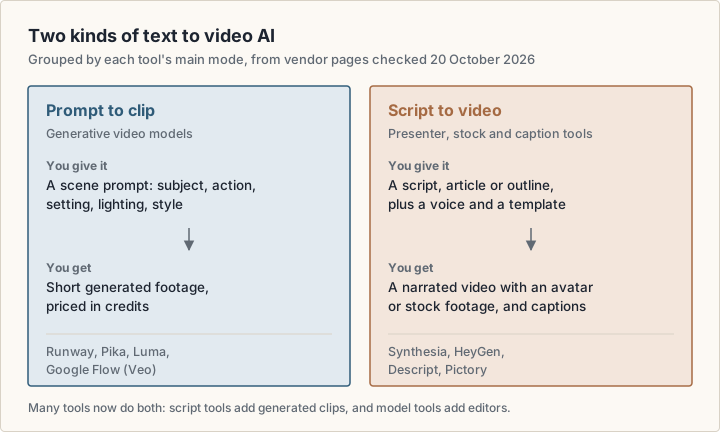
The line between the two is blurring. InVideo's pricing page (opens in a new tab) lists generative models such as Google Veo 3.1 and Sora 2 inside an editor, and Descript's pricing page (opens in a new tab) lists an AI video maker that builds a video from "GPT-generated scripts and visuals" with text-to-speech narration. For most marketing videos, a script to video tool does the heavy lifting and a generative clip fills the odd scene that stock footage cannot.
The content repurposing flywheel
A repurposing flywheel treats one long-form piece as the source for many short ones. The flywheel starts with a blog post, a detailed guide or a case study: the highest-effort asset, and the one that shows depth and drives search traffic. From it you extract shorter pieces: key insights become social posts, step-by-step sections become video scripts, and quotes become shareable graphics.
The content leverage equation
One well-written 1,200-word blog post can produce a 90-second LinkedIn video, a 60-second X video, three 15-second TikTok clips and one YouTube Short. That is five pieces of video from a single asset you have already written.
Video is a high-leverage derivative because one script can serve several platforms. A short video that summarises your best post of the month can go to LinkedIn, X, YouTube Shorts, TikTok and Instagram Reels, each in its own format. With a script to video tool, the extra cost of each version is mostly review time.
The flywheel depends on a steady cadence more than on perfect individual videos. A good-enough video every week gives you more to learn from than a polished one every month. AI tools make that cadence realistic for a small team because a first draft no longer needs a shoot.
Free AI video generators from text
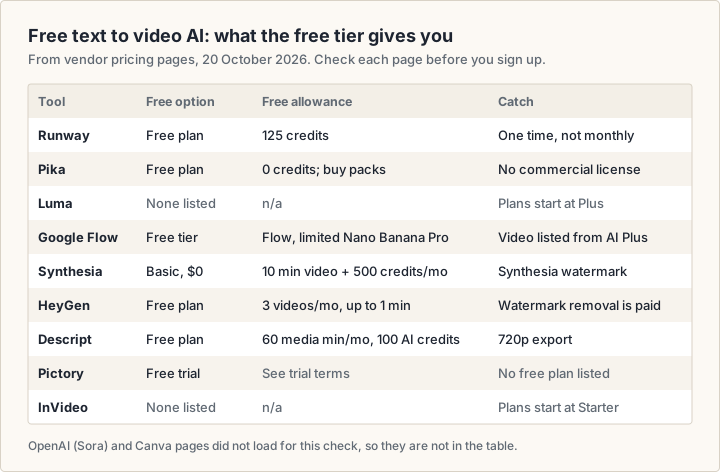
Searches for a free AI video generator from text usually end on a pricing page with credits, minutes and fine print. The figure and list below summarise what each free tier includes, as stated on the vendor's own pricing page on 20 October 2026. Plans change often: check the linked page before you rely on a limit.
AI text to video generator free tiers, tool by tool
- Runway: the Free plan is $0 with 125 one-time credits and "a selection of generative creative models". Runway prices Gen-4.5 at 60 credits per 5 seconds, so the credits do not stretch far. Standard costs $15 a month, or $12 a month billed annually, for 625 credits a month, and lists "No watermarks" among its features. Source: Runway pricing (opens in a new tab).
- Pika: the Free plan is $0 with 0 monthly credits ("packs only"), so you buy a credit pack to generate. The comparison table marks Free as watermark-free but without a commercial license; the commercial license starts on the $35-a-month Creator plan. Starter costs $10 a month for 900 credits. Source: Pika pricing (opens in a new tab).
- Luma: the pricing page lists no free plan. Plus is $30 a month, or $300 billed yearly, with 10,000 credits. Source: Luma pricing (opens in a new tab).
- Google Flow (Veo): Google's free tier ($0 with a Google Account) includes Flow with "limited access to Nano Banana Pro", Google's image model. Video generation is listed from Google AI Plus ($4.99 a month, with 200 Flow credits); Google AI Pro ($19.99 a month) adds 1,000 Flow credits and a limited trial of Veo 3.1 Lite. Source: Google AI plans (opens in a new tab).
- Synthesia: the Basic plan is $0 and includes 10 minutes of video creation or dubbing and 500 credits a month. The page states that Basic videos "carry a Synthesia watermark". Starter is $29 a month billed monthly. Source: Synthesia pricing (opens in a new tab).
- HeyGen: the Free plan is $0 for 3 videos a month, each up to 1 minute, with 500+ stock video avatars. Watermark removal, 1080p export and videos up to 30 minutes are listed under Creator at $29 a month. Source: HeyGen pricing (opens in a new tab).
- Descript: the Free plan includes 60 media minutes a month, 100 AI credits (one time) and 720p export. Descript describes its first paid plan, Hobbyist, as watermark-free, with paid plans "from $16/month". Source: Descript pricing (opens in a new tab). Descript also has a listing on listing.sh.
- Pictory: the pricing page offers a free trial on each plan but lists no free plan. Source: Pictory pricing (opens in a new tab).
- InVideo: the pricing page lists no free plan; paid plans start at Starter with 400 credits a month, and the FAQ says unused credits do not roll over. Source: InVideo pricing (opens in a new tab).
Not in this list
OpenAI's Sora pages and Canva's pricing page returned an access error when this article was checked, so their free limits are not stated here. Check them directly if you want to compare them.
What the free limits mean in practice
- Credits or minutes: generative tools count credits per clip or per second of output, so a free allowance buys a few seconds of footage. Script to video tools count minutes or videos, which suits a short weekly explainer better.
- One time or monthly: Runway's free credits and Descript's free AI credits are one-time; Synthesia's and HeyGen's allowances are monthly.
- Watermarks: Synthesia's Basic videos carry a watermark, and HeyGen lists watermark removal as a paid feature. Decide whether a watermark is acceptable on a brand channel before you build a workflow on a free tier.
- Commercial use: Pika's table marks the commercial license as "No" on Free and Starter. For any tool, read the plan terms before you use free output in an ad or on a client's channel.
- Resolution and length: Descript's free export is 720p, and HeyGen's free videos stop at 1 minute.
Script to video AI: turning writing into video
Script to video AI is the part of this category most useful to a content team, because the input is the writing you already have. The tool maps each line of your script to a scene, adds a voice and captions, and exports the formats you ask for. Synthesia and HeyGen build the scene around an AI avatar presenter; Descript and Pictory lean on stock media, text-to-speech and editing; Pictory's pricing page lists a "Script to Video" tool and AI voices from ElevenLabs "in 29 languages" on its plans.
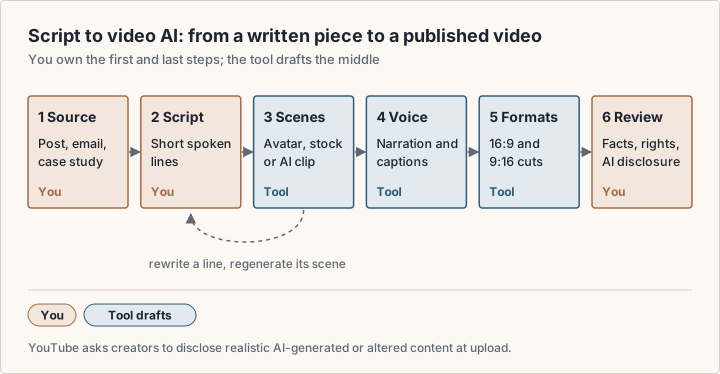
- 1Pick the source: one post, newsletter or case study with a clear point.
- 2Cut it to a spoken script: three or four short lines per idea, read aloud to time it.
- 3Paste the script into the tool and pick a template, an avatar or stock style, and a voice.
- 4Check each scene against its line. Rewrite the line, not the scene, when the visual misses: the tool redraws from your words.
- 5Export a horizontal and a vertical version from the same project.
- 6Review facts, music and footage rights, and whether the platform needs an AI disclosure before you publish.
Some tools generate the script for you from a topic or a URL. That saves time, but the result is a first draft: check every claim it makes about your product, your prices or your customers before it goes out under your brand.
Writing scripts that convert to great video
The gap between a weak and a strong AI-generated video usually starts in the script. AI video tools turn structure into visuals well; they do not rescue disorganised text. A few principles help.
Keep sentences short. The tools work in chunks: they split your text into phrases and map each phrase to a scene and a caption. Long sentences with several clauses make that mapping harder. Aim for plain language and sentences of about 15 words or fewer. If your source post has long paragraphs, rewrite the key points as short statements before you paste them in.
Use a three-part structure even for short videos: the problem the viewer has, the insight they are missing, and the action to take. This maps to a natural scene sequence and gives the tool clear cues for each segment.
- Open with the point, not with context or a logo: viewers on social feeds decide fast whether to keep watching
- Use specific numbers and examples where you have them, rather than vague claims
- End with one specific action, such as "read the full guide" with the link in the post, rather than a generic "learn more"
- Avoid jargon a non-specialist would not know: an AI voice cannot adjust its delivery to help the listener
- Time the script by reading it aloud at the pace you want: that is the real length of the video
Prompts for generative clips
When a scene needs generated footage rather than stock, write the prompt like a shot description. Google's Flow help page (opens in a new tab) asks you to be specific about the subject, action, environment, lighting and style, and lets you set the aspect ratio, number of outputs, model and generation length before you generate. Ask for several variations and keep the one that fits the line it illustrates.
Platform-specific video strategy
One file does not suit every platform. Platforms differ in aspect ratio, typical length, audience expectations and how they distribute video. With a script to video tool, an extra platform version costs little once the base script exists, so plan around the message first and treat each platform as an export setting.
| Feature | LinkedIn / YouTube | TikTok / Instagram Reels / Shorts |
|---|---|---|
| Aspect ratio | 16:9 horizontal | 9:16 vertical |
| Typical length | Longer explainers | Short clips |
| Caption style | Full subtitle transcript | Large, dynamic text overlays |
| Content that fits | Educational, thought leadership | Quick tips, single ideas |
| Distribution model | Network and search | Recommendation feed |
Most script to video tools ask for the aspect ratio when you start a project, and Google Flow asks for it before each generation. Check each platform's current upload limits in its own help pages, since they change.
Voiceover and audio strategy
Audio quality drives how professional a video feels. Viewers forgive plain visuals more easily than muddy or badly paced sound. AI voices are now a standard feature: HeyGen's pricing table lists 1,000+ AI voices, and Pictory's plans include ElevenLabs voices in 29 languages.
Choose the voice deliberately. A measured, neutral voice suits most B2B explainers; a livelier one may suit consumer content. Try two or three voices on the same script with a small audience before you commit to one for your channel. If a tool offers voice cloning (HeyGen lists it from the Creator plan), clone only a voice you have the right to use, such as your own.
Background music is the element most often set wrong. Default tracks in AI video tools are often loud enough to compete with the voice. Turn the music down until the narration is easy to follow on a phone speaker, then check the video once with the sound off to make sure the captions carry it.
A practical video production workflow
- 1Audit your content: pick the three best-performing posts from the last 90 days.
- 2Extract three core insights from each post and rewrite them as short-sentence scripts.
- 3Make one video per script in a script to video tool; adjust timing and fix any scene that misses its line.
- 4Try two templates or voices per script and compare how each performs on the platform.
- 5Export horizontal and vertical versions, add captions, and add an AI disclosure where the platform requires one.
- 6Track completion rate and clicks per video, and feed what works back into step 1.
Measuring video performance
View count alone says little about AI-generated video: feed-driven platforms can show a clip to many people who scroll past in a second. The metrics that predict marketing impact are completion rate (the share of viewers who watch to the end), engagement rate (comments and shares divided by views) and click-through rate on your call to action.
Set your own baseline from your first few videos rather than chasing a generic benchmark. If completion is low, look at the first few seconds before anything else: the opening line is the cheapest thing to change and the most likely cause.
To see whether video drives profile visits, newsletter sign-ups or product page traffic, tag your links and track them in your web analytics. Our product analytics guide covers the tools, and our guide to growing an audience on X and Reddit covers the distribution side.
Tips for better AI-generated videos
- Keep social scripts short: one idea per video
- Always add captions, even with a voiceover: many people watch social video with the sound off
- Use the first seconds for the hook, not for context or a brand intro
- Match length and aspect ratio to each platform rather than posting one file everywhere
- Publish on a steady schedule: cadence gives you data to improve from
- Replace the default thumbnail with a still frame that shows the point of the video
- Read the plan terms for watermarks and commercial use before a free-tier video goes into an ad
“The goal isn't Oscar-quality video. It's consistent, on-brand content that shows up reliably. AI tools make that affordable for a small team, and consistency is what actually builds audiences.”
— Tama
Frequently asked questions
What is text to video AI?
Text to video AI is software that makes a video from written input. Generative models such as Runway, Pika, Luma and Google's Veo turn a scene prompt into new footage. Script to video tools such as Synthesia, HeyGen, Descript and Pictory turn a script into a narrated video with an avatar or stock footage and captions.
Is there a free AI video generator from text?
Yes, with limits. As of October 2026, Synthesia's Basic plan includes 10 minutes of video a month with a watermark, HeyGen's Free plan includes 3 videos a month up to 1 minute each, Descript's Free plan includes 60 media minutes a month at 720p, and Runway's Free plan includes 125 one-time credits. Luma and InVideo list no free plan. Check each pricing page, since limits change.
Is there a free AI text to video generator with no sign-up?
None of the pricing pages above describes a free tier without an account. Each one starts the free plan from a sign-up or "Get started" button, and Google's free tier is "$0/ month with a Google Account".
Can I use free AI-generated videos commercially?
It depends on the tool and plan. Pika's comparison table, for example, lists no commercial license on its Free and Starter plans. Read the plan terms of the tool you use before a free-tier video goes into an ad, a client project or a monetised channel.
How do I choose a text to video AI generator?
Start from the output you need. For a presenter-style explainer or training video, look at script to video tools and compare minutes per month, watermark rules and avatar options. For short cinematic shots, look at generative models and compare credits per second and commercial terms. Then run one real script through the free tier before you pay.
Do I need to disclose AI-generated video?
On YouTube, yes, when it looks real. YouTube's help page on altered or synthetic content (opens in a new tab) requires creators to disclose AI-generated or meaningfully altered content that seems realistic, and adds a label to the video. Clearly unrealistic content and minor edits do not need disclosure. Check the rules of each platform you publish on.
Sources
- Runway: pricing (opens in a new tab)
- Pika: pricing (opens in a new tab)
- Luma: plans and pricing (opens in a new tab)
- Google: Google AI plans (US) (opens in a new tab)
- Google Flow Help: create videos in Google Flow (opens in a new tab)
- Synthesia: pricing (opens in a new tab)
- HeyGen: pricing (opens in a new tab)
- Descript: pricing (opens in a new tab)
- Pictory: pricing (opens in a new tab)
- InVideo: pricing (opens in a new tab)
- YouTube Help: disclosing altered or synthetic content (opens in a new tab)