SEO tools collect the data you need to improve how a site shows up in search: which queries bring visitors, which pages Google has indexed, what is broken, and who links to you. Some of the most useful ones are free, starting with Google Search Console. Paid suites add keyword databases, competitor data and rank tracking at scale.
This guide compares free and paid SEO tools by the job they do: keyword research, rank tracking, site audits, backlinks, content and AI search. listing.sh did not run these tools side by side. Features and limits come from each vendor's own pages, and prices are in US dollars as of October 2026. Check the vendor page before you buy, because plans change often.
What an SEO tool does, and what it cannot do
Every SEO tool answers one of two questions: what is happening on your own site, or what is happening across the web. The difference matters, because the data comes from different places.
- First-party data comes from the search engine itself. Google Search Console reports the clicks, impressions and average position your pages actually got in Google Search.
- Third-party data comes from a vendor's own crawler and keyword database. Ahrefs, Semrush, Moz and SE Ranking estimate search volume, traffic and backlinks for any site, including your competitors'.
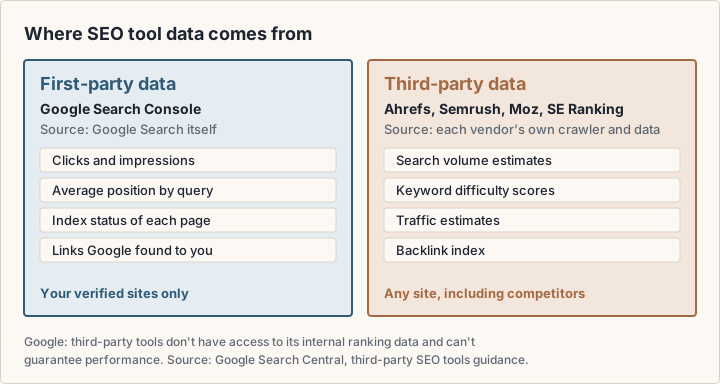
Google is direct about the limits of the second kind. Its guidance on third-party SEO tools (opens in a new tab) says: "Third-party tools don't have access to our internal ranking data. They can't guarantee performance." Google also says it doesn't evaluate third-party services, and that using a tool does not guarantee ranking success. Whether or not you buy a tool, Google recommends Search Console as the first-party source.
So treat a paid tool's search volume, keyword difficulty and traffic estimate as a model, not a measurement. They are useful for comparing options, such as two keywords or two competitors. They are less useful as absolute numbers.
The jobs SEO tools do
Most tools, free or paid, cover some of these six jobs. Decide which jobs you have before you compare products, because a suite that does all six costs more than a tool that does the one you need.
- Keyword research: find what people search for, how often, and how hard it is to rank.
- Rank tracking: record where your pages appear for chosen keywords over time.
- Site audit: crawl your site for broken links, redirects, missing titles, duplicate pages and indexing problems.
- Backlink analysis: see which sites link to you or to a competitor.
- Content optimisation: compare a draft against the pages that already rank for a query.
- AI search visibility: track whether AI answers, such as Google's AI Overviews or ChatGPT, mention or cite your site.
Google Search Console and other Google SEO tools
Search Console reports data directly from Google Search, which no third-party tool can do. Start with it and the other Google tools below before you pay for anything.
Google Search Console
Google Search Console is "a free service offered by Google" for site owners (Search Console Help (opens in a new tab)). Per Google's getting-started guide (opens in a new tab), it shows how Google crawls, indexes and serves your site. You verify that you own the site, and Google emails you when it finds new issues. Google suggests checking the account about once a month, or after you change the site's content.
The reports most people use:
- Performance report (opens in a new tab): clicks, impressions, click-through rate and average position, broken down by query, page and country. The default view covers the past three months.
- URL Inspection (opens in a new tab): Google's indexed version of one page, and a test of whether a URL might be indexable.
- Page indexing and Sitemaps: which pages Google indexed or tried to index, and the sitemaps you submitted (Search Console overview (opens in a new tab)).
- Links report (opens in a new tab): your most linked pages and the sites that link to you most. It is a sample, tables stop at 1,000 rows, and it does not say whether a link is nofollow.
- Core Web Vitals and rich result reports: page experience on mobile and desktop, and the state of your structured data.
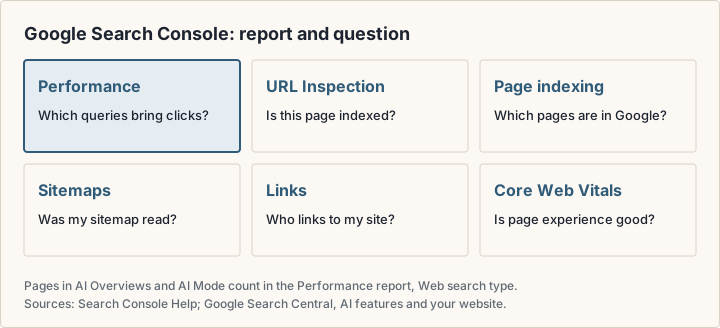
Search Console also covers AI features. Google's AI features guide (opens in a new tab) says pages that appear in AI Overviews and AI Mode count toward your overall search traffic, in the Performance report under the Web search type. The same guide says there are no additional requirements to appear in those features beyond normal SEO best practice.
PageSpeed Insights and Lighthouse
PageSpeed Insights (opens in a new tab) reports the user experience of a page on mobile and desktop and suggests fixes. It gives lab data for debugging, and field data from real Chrome users over the previous 28 days: First Contentful Paint, Interaction to Next Paint, Largest Contentful Paint and Cumulative Layout Shift. Lighthouse (opens in a new tab) is the open-source tool behind the lab data. It audits performance, accessibility, SEO and more, and runs in Chrome DevTools, from the command line or as a Node module.
Rich Results Test
The Rich Results Test (opens in a new tab) takes a URL or a block of code and shows which rich result types Google found, plus any errors or suggestions for your structured data. You can test as a smartphone or desktop user agent.
Keyword Planner and Google Trends
Keyword Planner (opens in a new tab) suggests keywords related to your products, services or website, and gives search volume and forecasts. Unlike the tools above, it lives inside Google Ads, and Google says you must enter billing information to access basic features. It is built for advertisers; our guide to online advertising platforms covers that side.
Google Trends (opens in a new tab) shows relative interest, not search volume. It uses a sample of Google searches, normalised to time and place and scaled from 0 to 100. Use it to compare terms or spot seasonality, not to estimate traffic.
Bing Webmaster Tools
Microsoft's counterpart covers Bing. Microsoft describes Bing Webmaster Tools (opens in a new tab) as the place to troubleshoot crawling and indexing issues, submit sitemaps and view statistics for your sites. Its API also exposes rank and traffic stats, link details and keyword details.
Other free SEO tools and their limits
Several paid vendors offer a free tier. Each one has a limit, so check that it covers the size of your site.
- Ahrefs Free (opens in a new tab) (formerly Ahrefs Webmaster Tools) gives free access to Site Explorer, Site Audit and Web Analytics for sites you verify. Site Audit gets 5,000 crawl credits per verified project per month, and you can see up to 1,000 backlinks and 1,000 keywords at once.
- Screaming Frog SEO Spider (opens in a new tab) is free desktop software that crawls up to 500 URLs. A paid licence removes that limit and adds advanced features.
- Semrush Free (opens in a new tab) includes one demo project and 10 reports per day across its main tools, with no credit card.
- Moz lists free versions of Keyword Explorer, Link Explorer, Domain Analysis and the MozBar browser extension on its site (opens in a new tab). Check each tool's page for its limits.
- WordPress SEO plugins handle titles, meta descriptions and sitemaps inside your site. Yoast SEO (opens in a new tab) lists 10+ million active installations on WordPress.org, Rank Math (opens in a new tab) 4+ million and All in One SEO (opens in a new tab) 2+ million. Each has a free version and paid upgrades.
Where free tools stop
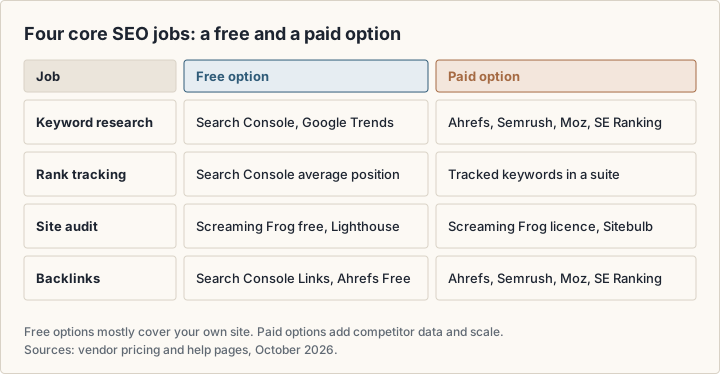
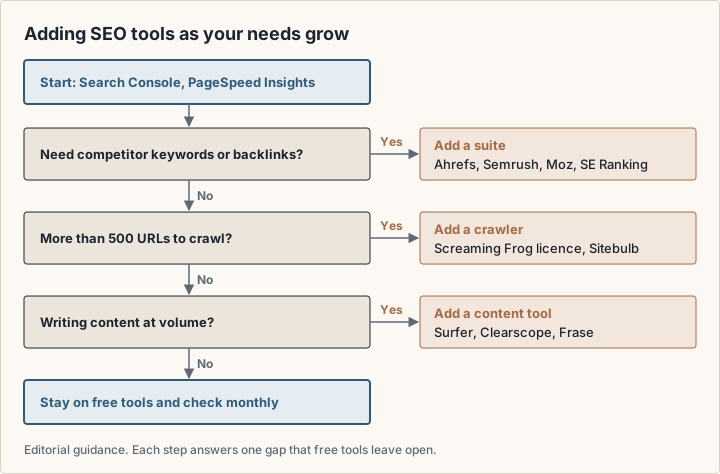
Free tools cover your own site well. They rarely show competitors' keywords and backlinks, track rankings for keywords you choose, or crawl large sites. Those three gaps are what most paid plans sell.
Paid SEO tools compared
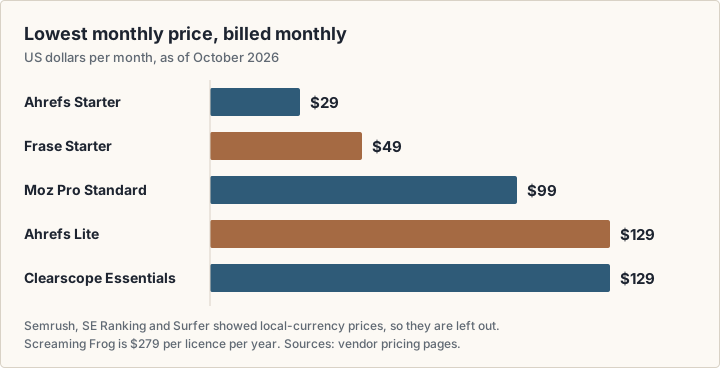
The table lists the cheapest paid plan for each tool, as each vendor shows it. Prices are per month, billed monthly, in US dollars as of October 2026, unless the row says otherwise. Several vendors show prices in local currency based on your location; for those, the row links to the pricing page instead of guessing a dollar figure.
| Feature | Lowest paid plan (October 2026) | What that plan includes |
|---|---|---|
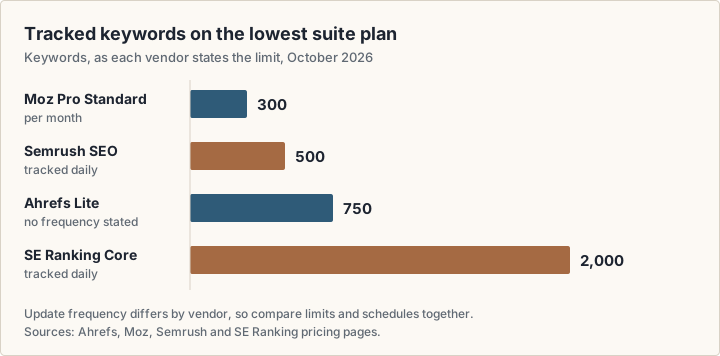
| Ahrefs | Starter $29/mo; Lite $129/mo | Starter: keyword and competitor research. Lite: 750 tracked keywords, 100,000 crawl credits, 6 months of history, 1 user |
| Moz Pro | Standard $99/mo ($79/mo billed yearly) | 1 user, 3 tracked sites, 300 tracked keywords, 400K pages crawled per month |
| Semrush | Shown in local currency; see pricing page | SEO plan: 5 websites, 500 keywords tracked daily, Position Tracking, Site Audit |
| SE Ranking | Shown in local currency; see pricing page | Core plan: 10 projects, 1 seat, 2,000 keywords and 100 AI prompts tracked daily |
| Screaming Frog | $279 per licence, per year | Removes the 500-URL crawl limit; adds advanced features |
| Clearscope | Essentials $129/mo | 50 tracked queries, 50 pages, 20 topic explorations and 20 drafts per month |
| Frase | Starter $49/mo ($39/mo billed yearly) | 1 seat, 1 site, 10 articles and 50 audit pages per month |
Ahrefs
Ahrefs sells Starter at $29/mo and three main plans: Lite at $129/mo, Standard at $249/mo and Advanced at $449/mo, billed monthly (Ahrefs pricing (opens in a new tab)). Paying annually saves up to 17%. Tracked keywords rise from 750 on Lite to 2,000 on Standard and 5,000 on Advanced, and history from 6 months to 2 and 5 years. Each plan includes one user; extra users cost $40, $60 or $80 a month depending on the plan. Enterprise is $1,499/mo with an annual commitment.
Semrush
Semrush groups its plans as SEO, SEO plus AI Search (Starter and Pro+) and Advanced (Semrush pricing (opens in a new tab)). Its pricing page showed us prices in euros, based on location, so check the page for your currency. The SEO plan covers 5 websites and 500 keywords tracked daily; Pro+ raises that to 15 websites and 1,500 keywords and adds historical data and content optimisation. Semrush offers a seven-day free trial and a free plan.
Moz Pro
Moz Pro (opens in a new tab) lists three plans in US dollars: Standard at $99/mo, Medium at $179/mo and Large at $299/mo, or $79, $143 and $239 a month billed yearly. Medium includes 2 users, 10 tracked sites and 1,500 tracked keywords; Large includes 3 users, 25 sites and 3,000 keywords. All three plans include AI visibility features, such as tracked prompts across GPT, Gemini, Google AI Mode and Perplexity.
SE Ranking
SE Ranking (opens in a new tab) also showed prices in local currency, so check its page. Core includes 10 projects, one manager seat, 2,000 keywords and 100 AI prompts tracked daily, and 250,000 audit pages a month. Growth raises those to 30 projects, 3 seats and 5,000 keywords. Both start with a 14-day free trial with no credit card.
How to choose SEO tools by task
Pick the job first, then the cheapest tool that does it well enough for your site's size. The notes below say what to check for each job.
Keyword research
Start with the Search Console Performance report: it lists queries you already get impressions for, which are often the fastest wins. Keyword Planner and Google Trends add ideas and seasonality. Pay for a suite when you need keyword ideas outside your own data, difficulty scores or competitors' keywords. Ahrefs Starter at $29/mo is the lowest dollar price in the table for keyword and competitor research.
Rank tracking
Search Console shows your average position for every query, but only after the fact and averaged across searches. A rank tracker checks chosen keywords on a schedule, by location and device. Compare the tracked-keyword limit and how often it updates: the plans below state their limits differently, some per day and some per month.
Site audit
For a site under 500 URLs, Screaming Frog's free version and Lighthouse cover most technical checks. Ahrefs Free audits verified sites with 5,000 crawl credits per project each month. For larger sites, a Screaming Frog licence costs $279 a year, falling to $235 per licence at 20 or more. Sitebulb (opens in a new tab) Lite audits up to 10,000 URLs and Pro up to 500,000 URLs per audit, with a 14-day free trial; its price is on the vendor page. Ahrefs, Semrush, Moz Pro and SE Ranking each include a site audit too.
Backlink analysis
Search Console's Links report shows a sample of who links to you. Ahrefs Free shows up to 1,000 of your own backlinks at once. Competitor backlinks need a paid index: Ahrefs, Semrush, Moz and SE Ranking each sell one. Each vendor builds its own link index, so counts differ between tools; compare trends inside one tool rather than numbers across tools.
Content optimisation
Content tools help you plan and check a draft for a target query. Clearscope (opens in a new tab) prices its plans for SEO and AI search visibility: Essentials at $129/mo and Business at $399/mo, with a 14-day free trial. Frase (opens in a new tab) Starter is $49/mo month to month, Professional $129/mo and Scale $299/mo, with a seven-day free trial, and lists SEO and GEO scores among its features. Surfer showed its prices (opens in a new tab) in euros for us, so check the page. Google's guidance applies here too: a content score is the vendor's model, and Google says it doesn't evaluate third-party services.
AI search visibility
Several suites now track prompts in AI assistants. Ahrefs Lite includes 150 checks on AI prompts, Moz Pro Standard 150 tracked prompts, Semrush Starter 50 prompts tracked daily, and SE Ranking Core 100. Google's third-party tools guidance (opens in a new tab) names "AEO" and "GEO" tools directly and asks you to be wary of claims that a service is approved by Google. For Google's own AI features, Search Console already counts the traffic.
Choosing by team size
- Bloggers and small businesses: Search Console, PageSpeed Insights, a WordPress SEO plugin if you use WordPress, and Screaming Frog's free crawler cover the basics at no cost. Add one low-cost plan, such as Ahrefs Starter, only when you run out of keyword ideas.
- In-house marketing teams: a suite becomes useful when several people share projects and need competitor data. Check seats included per plan: Ahrefs includes one, Moz Medium two, SE Ranking Growth three.
- Agencies: look at project counts, client reporting and white-label options. SE Ranking sells an Agency Pack add-on with white-label reporting, and Semrush's Pro Report add-on includes branding and white-labeling. Both vendors list these add-ons in local currency.
Check before you pay
Read the plan limits, not the plan name: seats, projects, tracked keywords, crawl credits and report caps. Check whether the price is monthly or billed yearly, whether tax is added, what currency you will be charged in, and how to cancel. Use the free trial on your own site before you commit.
Whatever you add, keep measuring on your own site. Search Console shows what happens before the click; web analytics such as Plausible or PostHog show what visitors do after it. Our PostHog and Plausible guide compares the two.
Frequently asked questions
What are some free SEO tools available?
Google Search Console is a free service, and Lighthouse is open source. Vendors add free tiers too: Ahrefs Free, Screaming Frog's crawler up to 500 URLs, Semrush Free, Moz's free research tools, and the free versions of WordPress plugins such as Yoast SEO and Rank Math.
Is Google Search Console an SEO tool?
Yes. It is Google's free tool for site owners, and it reports clicks, impressions, positions and index status directly from Google Search. Google recommends it whether or not you use other tools.
What AI tools are there for SEO?
Two kinds. Content tools such as Clearscope and Frase help plan and score drafts; Frase lists SEO and GEO scores. Suites such as Ahrefs, Semrush, Moz and SE Ranking track prompts in AI assistants. Google warns that no third-party tool has its ranking data.
How do I rank number 1 on Google?
No tool can promise it. Google's SEO Starter Guide (opens in a new tab) says there are "no secrets here that'll automatically rank your site first in Google". Tools help you find problems and opportunities; the content still has to be the most useful answer.
What is an SEO checklist?
A list of basics to confirm: Google can crawl and index your pages, each page has a clear title and description, the site is fast on mobile, and content answers the query. Search Console, PageSpeed Insights and a crawler check most of it.
Are paid SEO tools worth it for a small business?
Only if you need what free tools lack: competitor keywords and backlinks, scheduled rank tracking, or large crawls. Try the free tier or trial on your own site first.
Sources
- Google Search Central: guidance on third-party SEO tools and advice (opens in a new tab)
- Search Console Help: about Search Console (opens in a new tab)
- Google Search Central: get started with Search Console (opens in a new tab)
- Google Search Console overview (opens in a new tab)
- Search Console Help: Performance report (opens in a new tab)
- Search Console Help: URL Inspection tool (opens in a new tab)
- Search Console Help: Links report (opens in a new tab)
- Google Search Central: AI features and your website (opens in a new tab)
- Google Search Central: SEO Starter Guide (opens in a new tab)
- PageSpeed Insights: about (opens in a new tab)
- Chrome for Developers: Lighthouse overview (opens in a new tab)
- Search Console Help: Rich Results Test (opens in a new tab)
- Google Ads Help: Keyword Planner (opens in a new tab)
- Google Trends Help: FAQ about Google Trends data (opens in a new tab)
- Microsoft Learn: Bing Webmaster API (opens in a new tab)
- Ahrefs: plans and pricing (opens in a new tab)
- Ahrefs Free (Ahrefs Webmaster Tools) (opens in a new tab)
- Semrush: plans and pricing (opens in a new tab)
- Moz Pro pricing (opens in a new tab)
- SE Ranking: subscription plans (opens in a new tab)
- Screaming Frog SEO Spider pricing (opens in a new tab)
- Sitebulb pricing (opens in a new tab)
- Surfer pricing (opens in a new tab)
- Clearscope pricing (opens in a new tab)
- Frase pricing (opens in a new tab)
- WordPress.org: Yoast SEO (opens in a new tab)
- WordPress.org: Rank Math SEO (opens in a new tab)
- WordPress.org: All in One SEO (opens in a new tab)