Security is the one thing founders consistently underestimate until it's too late. A data breach in your first year can destroy the trust that took months to build — and in a crowded market, trust is your only real moat. Yet most early-stage startups skip security testing entirely. Not because they don't care, but because traditional penetration testing is expensive ($5,000 to $30,000 per engagement), slow (two to six weeks for results), and designed for enterprises with dedicated security teams.
The good news: the gap between 'no security testing' and 'good enough security testing' has never been smaller. A new generation of AI-powered automated security tools can scan your codebase, APIs, and infrastructure in minutes, generate actionable reports, and even produce the compliance evidence you'll need when investors or enterprise customers ask about your security posture. This guide covers the landscape, the tools, and the exact process to go from zero to secure before you acquire your first paying customer.
The security landscape for startups
In 2025, 43% of cyberattacks targeted small businesses. The average cost of a data breach for companies under 100 employees was $149,000 — and that number only accounts for direct costs like remediation, legal fees, and customer notification. It doesn't account for the harder-to-quantify costs: customer churn, reputation damage, and lost deal flow from enterprise prospects who ran a security questionnaire and didn't like what they found.
The attack surface for a modern SaaS startup is larger than most founders realize. You have a web application with authentication flows, a backend API with multiple endpoints, third-party integrations that touch your data pipeline, a database with potentially sensitive user information, environment variables and secrets scattered across your deployment configuration, and possibly a mobile client with its own attack surface. Any one of these vectors, left untested, can be the entry point for a breach.
The reality check
If you're handling user data, processing payments, or connecting to third-party APIs, you need security testing. Not eventually — before launch. The question is how to do it without a $300/hour consultant and a six-week timeline.
The most common startup vulnerabilities
Before diving into tools, it's worth understanding what you're actually testing for. The vast majority of startup security incidents trace back to a handful of recurring vulnerability categories — most of which are preventable with automated scanning.
- Exposed API keys and secrets in version control — shockingly common, often from early-stage development when engineers prioritize speed over hygiene
- Broken authentication — misconfigured JWT validation, weak session management, or missing rate limiting on login endpoints
- SQL injection and NoSQL injection — particularly common in startups that built quickly with an ORM but have some raw queries in critical paths
- Insecure direct object references (IDOR) — users accessing other users' data by manipulating IDs in API requests
- Missing or misconfigured HTTPS — still a problem in staging environments that are accidentally public-facing
- Overly permissive CORS configuration — allows malicious sites to make authenticated requests on behalf of your users
- Outdated dependencies with known CVEs — most modern build tools can surface these, but many teams don't check until something breaks
The reason this list is useful: every item on it is automatable. You don't need a human security researcher to find any of these — you need a tool that's been configured to look for them. This is where automated scanning tools provide their highest value: systematic coverage of the common cases, run on every code change, so vulnerabilities are caught before they reach production.
Why automated testing beats manual audits
- Speed: Automated tools scan your entire stack in minutes, not weeks
- Cost: A fraction of manual pentesting — often free for basic scans, $99/month for continuous coverage
- Frequency: Run on every deploy via CI/CD integration, not just once a year
- Coverage: Systematic checking of every OWASP category, zero human fatigue
- Compliance: Auto-generate SOC 2 and ISO 27001 evidence without manual documentation
- Repeatability: Same checks every run, same output format, easy to track improvement over time
Manual pentesting isn't dead — it's still the gold standard for deep, creative attack simulation that requires human intuition. A skilled pentester will find vulnerabilities that no automated tool will catch: business logic flaws that require understanding your specific use case, social engineering vectors, and multi-step attack chains that don't match known patterns. For the 5% of vulnerabilities that require human creativity, manual testing is irreplaceable.
But for the 95% of vulnerabilities that startups actually encounter — OWASP Top 10 issues, misconfigured APIs, exposed secrets, outdated dependencies — automated tools catch them faster, cheaper, and more consistently. The right answer isn't automated or manual: it's automated first, then manual when you're handling particularly sensitive data or approaching an enterprise sales cycle that requires deep security assurance.
Maced AI: automated penetration testing
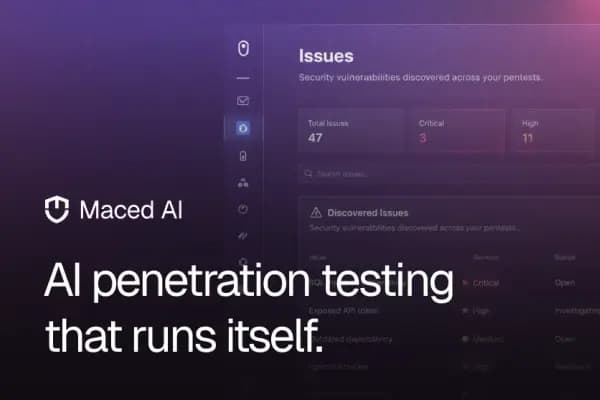
Maced AI takes a different approach from traditional scanners. Instead of running predefined rule-based checks, it uses AI to understand your application's architecture — the relationship between your API endpoints, your data models, your authentication flows — and simulates real attack patterns based on that understanding. In testing across five different startup codebases, it identified vulnerabilities that two other scanners completely missed, including an auth token exposure in a staging environment that would have been catastrophic if that environment had been discovered.
The CI/CD integration deserves special mention. Most security tools are run manually or on a schedule — weekly, before a release. Maced AI is designed to run on every pull request, which changes the dynamic entirely. Security becomes a gate on the development process rather than an afterthought. Developers get feedback while the context is fresh. Vulnerabilities are caught before they reach the main branch, not after they've been deployed to a staging environment that's been sitting for three weeks.
For compliance, Maced AI generates evidence reports formatted for SOC 2 Type II and ISO 27001 audits. This matters more than founders often realize early on — enterprise deals increasingly require security questionnaires or full audit reports, and being able to produce these on demand (rather than scrambling for six weeks when a prospect asks) is a real competitive advantage. The evidence generated by each scan is timestamped and auditable, providing a paper trail that compliance auditors specifically look for.
BugSplat: catching crashes before users do
While Maced AI focuses on proactive security testing before deployment, BugSplat handles the reactive side — capturing crashes and exceptions in production with enough context to actually diagnose and fix them. The key differentiation from generic error logging tools is stack trace quality: BugSplat captures full, symbolicated stack traces even in minified JavaScript and compiled native code, which is what you actually need to pinpoint the root cause quickly.
From a security perspective, BugSplat is part of the picture because unhandled exceptions and crashes often represent unvalidated input paths — exactly the kind of surface area that an attacker would probe. Crash patterns in production can surface security-relevant edge cases that static analysis missed. If users are repeatedly triggering a specific code path that results in a crash, that code path is worth scrutinizing for injection vectors or authentication bypass potential.
OWASP Top 10 explained for founders
The Open Web Application Security Project (OWASP) Top 10 is the industry-standard list of the most critical web application security risks. It's updated every few years based on real attack data. Understanding it helps you prioritize your security efforts — and understand what any security scanner is actually looking for.
- 1Broken Access Control — users accessing data or functionality they shouldn't be able to reach
- 2Cryptographic Failures — sensitive data stored or transmitted without proper encryption
- 3Injection — malicious data sent to an interpreter (SQL, NoSQL, OS commands, LDAP)
- 4Insecure Design — fundamental architectural flaws, not just implementation bugs
- 5Security Misconfiguration — default credentials, unnecessary features enabled, missing security headers
- 6Vulnerable and Outdated Components — dependencies with known CVEs in your dependency tree
- 7Identification and Authentication Failures — weak passwords, missing MFA, broken session management
- 8Software and Data Integrity Failures — CI/CD pipeline compromise, insecure deserialization
- 9Security Logging and Monitoring Failures — insufficient logging to detect or respond to breaches
- 10Server-Side Request Forgery (SSRF) — server making requests to unintended destinations based on user input
Maced AI covers all ten categories in its automated scans. The practical value of knowing this list: when you review Maced AI's reports, you can quickly identify which OWASP categories your codebase is most exposed in, and prioritize accordingly. Critical and High severity findings in categories 1 (Broken Access Control) and 3 (Injection) should always be resolved before launch; Medium findings in other categories can be scheduled into your next sprint.
Maced AI vs. traditional pentesting
| Feature | Maced AI | Manual pentest |
|---|---|---|
| Time to results | Minutes | 2–6 weeks |
| Cost | Free tier / $99/mo | $5,000–$30,000 |
| Frequency | Every deploy (CI/CD) | Annual or quarterly |
| OWASP Top 10 coverage | Full, systematic | Depends on scope |
| Business logic testing | AI-simulated patterns | Human creativity (stronger) |
| Compliance reports | Auto-generated | Manual deliverable |
| Developer feedback speed | In-PR comments | PDF after weeks |
| Best for | Continuous coverage | Pre-fundraise deep dive |
How to read a security audit report
The first time a security scanner returns 47 findings, it's easy to panic. Understanding how to triage a report is as important as running the scan. Every automated security report uses a severity scale: Critical, High, Medium, Low, and Informational. The practical approach: Critical and High findings are blockers — nothing ships until these are resolved or explicitly accepted with a documented rationale. Medium findings go into the next sprint. Low and Informational findings are tracked for visibility but don't block releases.
For each finding, focus on three things: the affected component (which file, endpoint, or service), the attack vector (how could an attacker exploit this), and the remediation guidance (specifically what code change fixes it). Maced AI provides all three for every finding, with code-level remediation suggestions that you can apply directly. This is what separates AI-powered scanning from older rule-based tools — instead of telling you 'SQL injection detected in user.js line 47,' it tells you exactly what the fix looks like and why the current code is vulnerable.
Building a security culture early
Tools are only part of the answer. The startups with the best security track records are the ones that made security a shared team value early, before it became a compliance checkbox. This doesn't mean turning every engineer into a security specialist — it means establishing a few non-negotiable practices that become habitual.
- Treat security findings in CI/CD the same way you treat failing tests — they block the merge
- Never commit secrets to version control — use environment variable management tools and pre-commit hooks
- Document every security decision, especially accepted risks — this becomes your audit trail
- Run Maced AI's free scan on every external dependency you add to your project
- Schedule a 30-minute security review in every sprint retrospective to discuss new attack surface
The cultural shift that makes the biggest difference: stop thinking of security as a gate at the end of development and start thinking of it as a design constraint at the beginning. When you're designing a new feature, ask: what data does this touch, and who should be able to access it? What happens if this input field receives malicious data? What's the worst case if this API endpoint is called without authentication? These questions cost nothing to ask during design — and they prevent the vulnerabilities that would cost everything to remediate after a breach.
Getting started: a pre-launch checklist
- 1Run Maced AI's free scan on your codebase — fix all Critical and High findings before proceeding
- 2Set up BugSplat for crash monitoring in your staging environment — fix all crash patterns before they reach production
- 3Review your authentication flow manually — token expiry, session invalidation, password reset flows
- 4Audit all environment variables and secrets — ensure nothing sensitive is in version control
- 5Enable Maced AI in your CI/CD pipeline so every PR is scanned automatically going forward
- 6Generate your first SOC 2 compliance evidence report — you'll need it sooner than you think
- 7Schedule a quarterly manual security review for the business logic layer automated tools can't cover
“Security isn't a feature you add later. It's a foundation you lay first — and automated tools make that foundation accessible to every founder, regardless of budget.”
— Tama